 AlpacaKeep
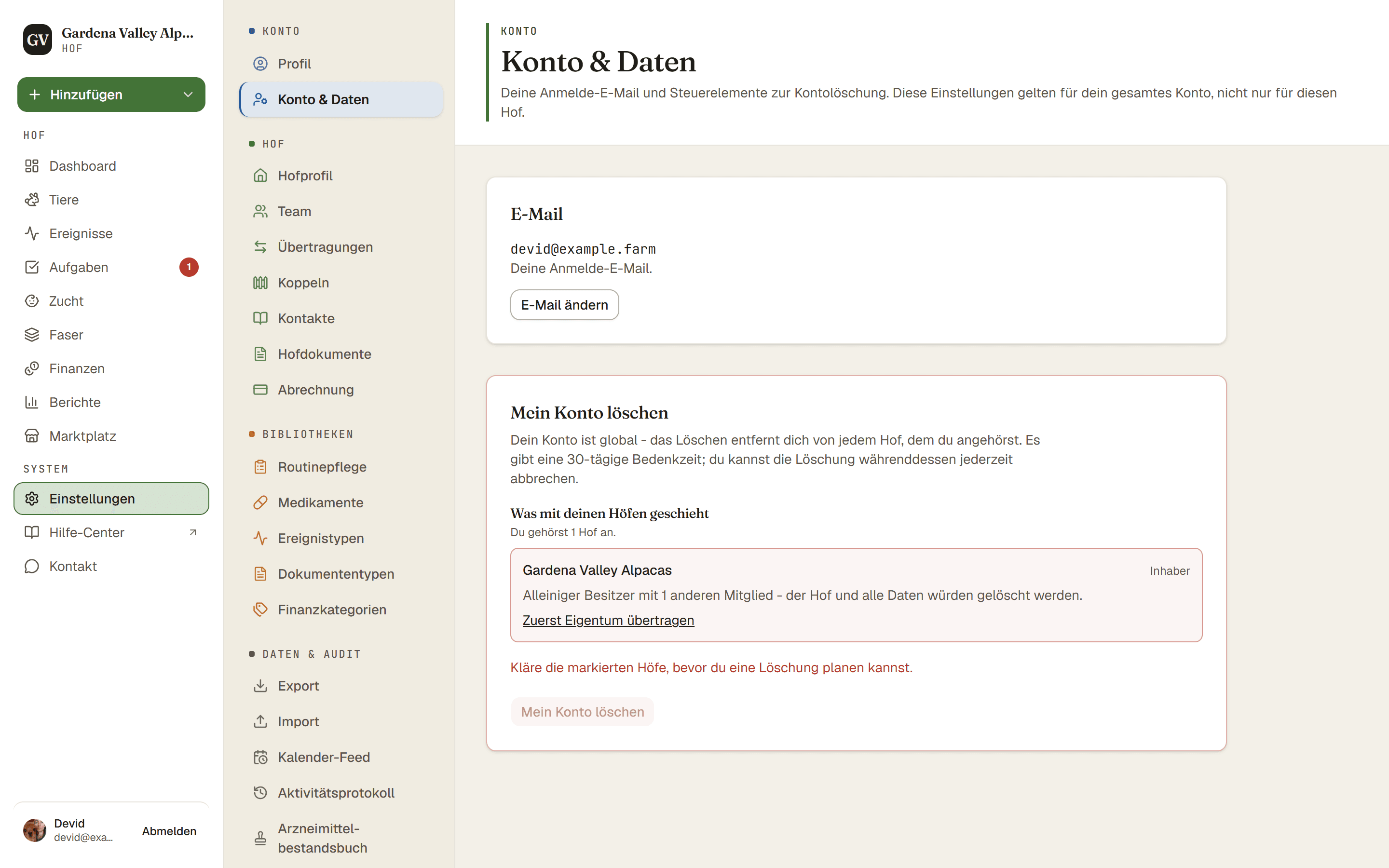
Dein Konto und deine Dateneinstellungen findest du unter Einstellungen → Konto & Daten. Hier beantragst du die Löschung deines Kontos. Die Löschung passiert nicht sofort: Du hast 30 Tage Zeit, es dir noch anders zu überlegen.
Dein Konto gilt für alle Höfe
Dein Konto ist eine Anmeldung, die zu mehr als einem Hof gehören kann. Wenn du es löschst, entfernt es dich deshalb von jedem Hof, dem du angehörst. Willst du nur einen Hof verlassen, geht das über dessen Team-Einstellungen, und dein Konto bleibt erhalten.
Deine eigenen Höfe werden mitgelöscht
Wenn du dein Konto löschst, wird auch jeder Hof gelöscht, dessen alleiniger Inhaber du bist und auf dem sonst niemand Mitglied ist. Das heißt der ganze Hof mit allem, was dazugehört: Tiere, Fotos, Dokumente und Finanzdaten. Wir behalten keine Kopie für dich. Wenn du diese Unterlagen brauchst (zum Beispiel für die Steuer), exportiere sie vorher. Die Seite Konto & Daten listet jeden deiner Höfe auf und zeigt dir, was mit ihm passiert.
Sind auf einem Hof, dessen Inhaber du bist, noch andere Mitglieder, kannst du die Löschung noch nicht planen. Übertrage zuerst das Eigentum an jemanden auf diesem Hof oder entferne die anderen Mitglieder. Tritt während der 30 Tage jemand diesem Hof bei, wartet die Löschung: Es wird nichts gelöscht, die Seite Konto & Daten sagt dir, warum, und die Löschung läuft weiter, sobald der Hof übertragen ist oder die Person ihn verlassen hat.
Geteilte Höfe
Höfe, auf denen du Mitbesitzer, Mitarbeiter oder Betrachter bist, bleiben bei ihrem Inhaber. Du wirst als Mitglied entfernt, und dein Name verschwindet. Was du dort eingetragen hast, zum Beispiel Ereignisse und Gewichte, bleibt bei diesem Hof, weil es zur Geschichte seiner Herde gehört.
So läuft die Löschung ab
- Einstellungen → Konto & Daten. Suche die Option zum Löschen des Kontos.
- Mein Konto löschen. Tippe DELETE MY ACCOUNT in das Feld und bestätige dann mit Löschung planen. Damit startet eine 30-tägige Bedenkzeit. Noch wird nichts entfernt.
- Warte oder brich ab. Du kannst den Antrag während dieser 30 Tage jederzeit abbrechen, dann ändert sich nichts.
- Nach 30 Tagen beginnt die Löschung in unserem nächsten nächtlichen Durchlauf. Dein Konto, deine persönlichen Daten und die Höfe, deren alleiniger Inhaber du bist, werden entfernt. Bis Fotos und Dokumente aus unserem Dateispeicher verschwunden sind, kann es noch ein paar Tage dauern.
- Schau in deine E-Mails. Wir schreiben dir, sobald alles erledigt ist.
Was bleibt
- Nachrichten, die du an Verkäufer geschickt hast, bleiben bei ihnen, ohne deinen Namen und deine E-Mail-Adresse.
- Falls du unseren Newsletter bekommen hast, bleibt deine Adresse als abgemeldet markiert, damit wir dir nie wieder schreiben.
- Wo das Gesetz es verlangt, die Unterlagen zu einem bezahlten Vertrag.
- Wenn ein Hof dich in seinem eigenen Adressbuch führt, zum Beispiel als Käufer, gehört dieser Eintrag dem Hof. Bitte den Hof, ihn zu ändern.
- Unsere Datenbank-Backups enthalten noch höchstens 7 Tage lang eine Kopie.
Gut zu wissen. Du gehörst keinem Hof an? Du kannst dein Konto trotzdem löschen. Nach der Anmeldung hat die Seite, auf der du einen Hof anlegen kannst, auch den Bereich Mein Konto löschen.
Tipp. Möchtest du vorher eine Kopie deiner Unterlagen? Exportiere sie, bevor du löschst. Siehe Deine Daten mitnehmen (Export).