 AlpacaKeep
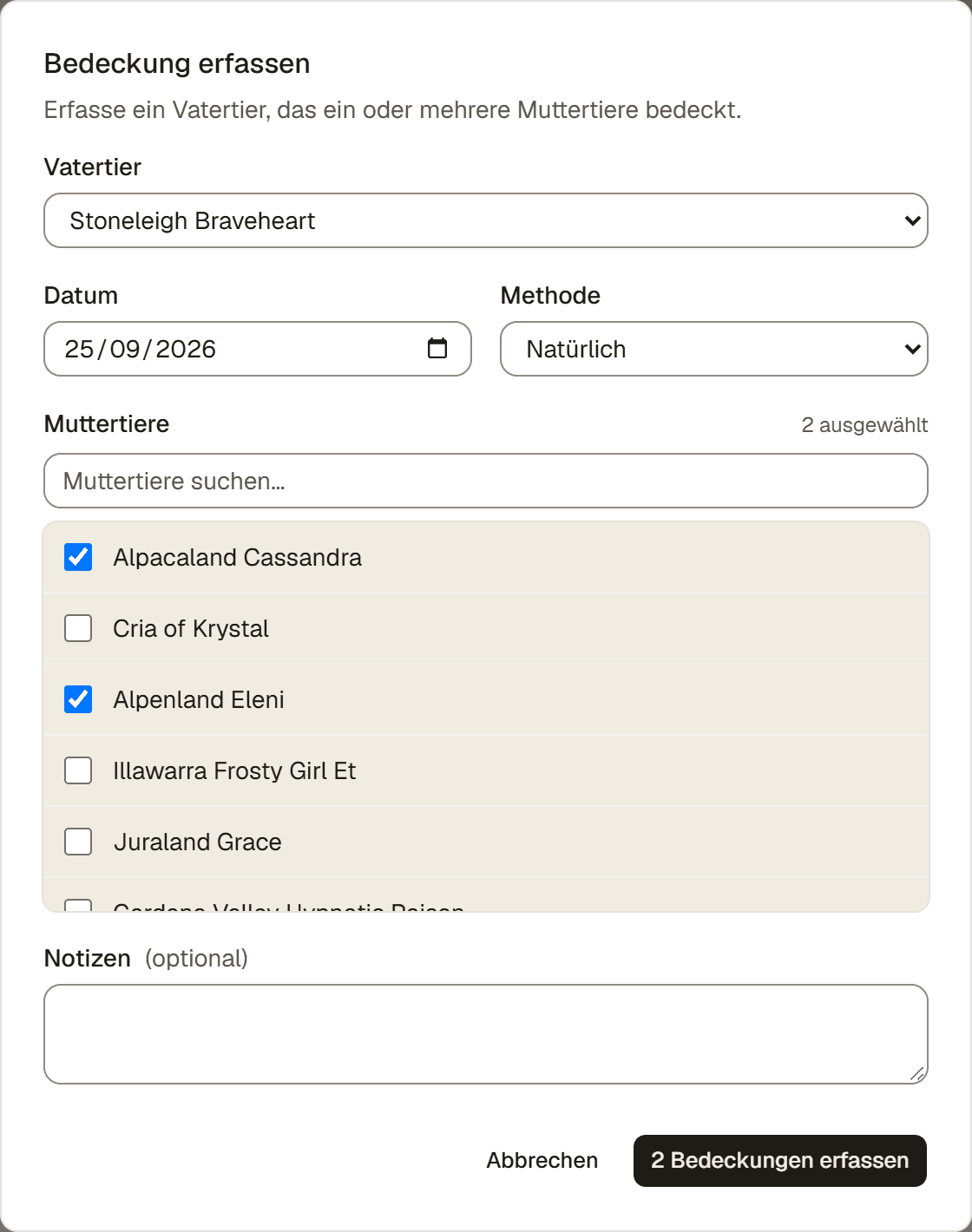
Um eine Bedeckung zu erfassen, gehe zum Zucht-Hub und drücke Bedeckung erfassen. Damit hältst du fest, dass ein Vatertier ein oder mehrere Muttertiere bedeckt. Jedes gewählte Muttertier bekommt seinen eigenen Zuchteintrag.
Schritte
- Zucht → Bedeckung erfassen. Das öffnet das Bedeckungsformular.
- Vatertier. Wähle das männliche Tier. Die Liste hat vier Gruppen: Deine Deckhengste (deine als Deckhengst markierten Hengste), Fremde Deckhengste (Deckhengste anderer Höfe, die du in den letzten zwei Jahren genutzt oder vor Kurzem angelegt hast, jeweils mit seinem Hof, etwa „Nicecracker · Alps Alpaca“), Weitere männliche Tiere und Früher genutzt (alle anderen fremden Deckhengste, die du je genutzt hast, von A bis Z). Verkaufte oder verstorbene Tiere erscheinen nie. Nutzt du zum ersten Mal einen Deckhengst von einem anderen Hof? Siehe Einen Deckhengst von einem anderen Hof nutzen weiter unten.
- Datum. Setze das Bedeckungsdatum. Es darf nicht in der Zukunft liegen.
- Methode. Wähle Natürlich oder Künstliche Besamung.
- Stuten. Suche und hake eine oder mehrere Stuten an. Eine Stute, die bereits trächtig ist, wird angezeigt, kann aber nicht ausgewählt werden. Eine Stute mit dem Hinweis unbestätigte Bedeckung kannst du trotzdem auswählen. Wurde sie nach einer Kontrolle neu gedeckt, mit demselben oder einem anderen Hengst, erfasse keine neue Bedeckung: Drücke bei ihrer bestehenden Bedeckung Kontrolle erfassen, wähle Abgelegt, dann Neu gedeckt, und wähle den Hengst. Eine Stute mit dem Hinweis geplant für ein Datum hat schon eine geplante Bedeckung; ist es genau diese, verschiebe den Plan mit Bedeckung bearbeiten, statt sie doppelt zu erfassen.
- Notizen (optional). Halte alles fest, was du dir merken willst.
- Bedeckungen erfassen. Der Button zählt die angehakten Stuten, zum Beispiel 2 Bedeckungen erfassen. Jede Stute erscheint jetzt im Zucht-Hub unter Trächtigkeiten, in Warten auf Bestätigung. Siehe Trächtigkeitskontrollen und Trächtigkeit bestätigen.
Einen Deckhengst von einem anderen Hof nutzen
Ein fremder Deckhengst ist ein Hengst von einem anderen Hof, zu dem du deine Stuten bringst oder der für einen Tag zu dir kommt.
- Vatertier → + Fremder Deckhengst. Der Button steht neben der Beschriftung Vatertier.
- Name des Deckhengstes. Tippe seinen Namen ein. Deckhengste, die du schon gespeichert hast, erscheinen unter Bereits gespeichert, auch alte Vorfahren aus einem Import. Groß- und Kleinschreibung und Akzente spielen keine Rolle. Drücke beim richtigen auf Wählen.
- Nicht dabei? Drücke Nicht dabei? „Name“ hinzufügen (passt nichts, öffnet sich dieser Teil sofort). Wähle Sein Hof (optional) aus deinen Hofkontakten, oder drücke + Neu hinzufügen, um einen neuen Hof zu speichern. Bestätige dann mit dem Button … hinzufügen, der seinen Namen zeigt. Ein gespeicherter Hengst mit demselben Namen kann ein anderes Tier sein, etwa ein alter Vorfahre: Dann drücke Nicht dieser? Einen anderen „Name“ hinzufügen. Das Jahr unter jedem gespeicherten Hengst hilft, sie auseinanderzuhalten.
- Bedeckungen erfassen. Er wird zusammen mit der Bedeckung gespeichert. Schließt du das Formular ohne zu speichern, wird er nicht angelegt. Klappt das Speichern nicht, korrigier es und speichere noch einmal: Er wird nicht doppelt angelegt.
Er wird zum Referenztier: Er erscheint in deinen Stammbäumen und zählt nicht zum Tier-Limit deines Plans. Ein Deckhengst, der eine Zeit lang auf deinem Hof lebt, auch ein gepachteter, gehört dagegen in deine Herde. Siehe Wann du ein Referenztier anlegst.
Gut zu wissen. Neu gedeckt in einer Trächtigkeitskontrolle zeigt dieselbe gruppierte Liste, aber ohne + Fremder Deckhengst. Einen neuen Deckhengst legst du dafür zuerst unter Tiere → ⋯ → Referenztiere an, mit Geschlecht auf Männlich.
Achtung: eine letale Farbkreuzung
Wenn Vatertier und ein Muttertier eine bekannte letale Farbkreuzung sind, etwa Grau mit Grau, zeigt AlpacaKeep beim Speichern eine Warnung. Hake Ich verstehe das Letalitätsrisiko an und speichere noch einmal, um die Bedeckung trotzdem zu erfassen. Das ist ein Sicherheitshinweis, keine Sperre. Eine Kreuzung von Grau mit einfarbigem Weiß bekommt stattdessen einen sanfteren Hinweis im Formular Neue Bedeckung des Muttertiers, ohne Häkchen. Siehe Die Warnung bei Grau-auf-Weiß-Zucht, was sie bedeutet und was ein DNA-Test daran ändert.
Gut zu wissen. Ein Vatertier kann in einer einzigen Erfassung mehrere Muttertiere bedecken. AlpacaKeep legt für jedes Muttertier einen eigenen Zuchteintrag an.
Achtung. Eine Bedeckung erfasst, die nie stattgefunden hat? Öffne in ihrer Zeile unter Warten auf Bestätigung das Menü ⋯ und wähle Bedeckung löschen. Du hast 30 Sekunden zum Rückgängigmachen. Hat sie stattgefunden, aber nicht geklappt, wähle stattdessen Nicht erfolgreich / verloren.