 AlpacaKeep
Quando registri un farmaco, puoi programmare la dose successiva nello stesso momento. AlpacaKeep la trasforma in un'attività di promemoria, così non dimentichi il richiamo o il resto di un ciclo.
Dove trovarla
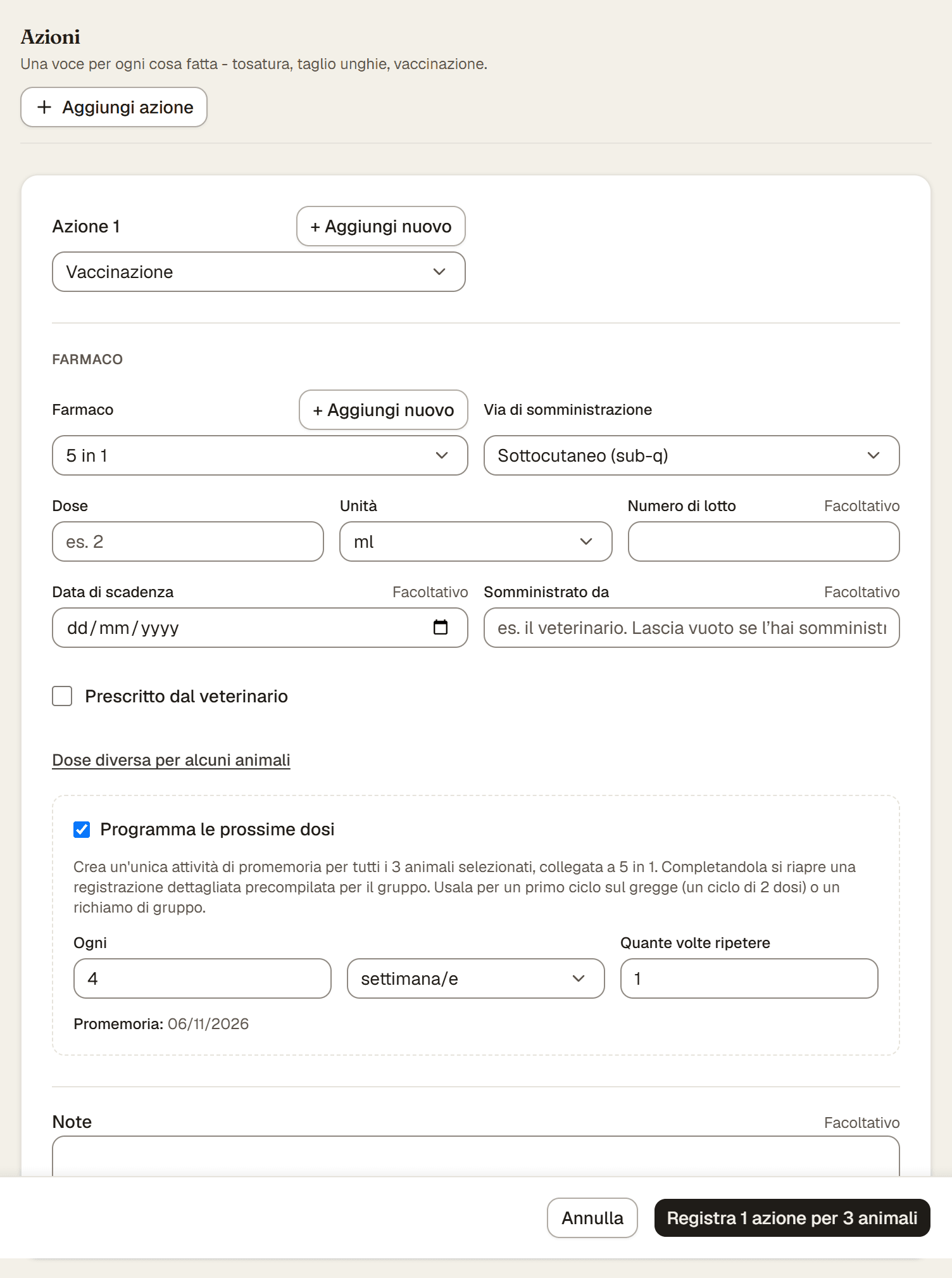
Le dosi successive si impostano nella Registrazione dettagliata: nella pagina Eventi, apri il menu ⋯ e scegli Registrazione dettagliata. Ogni farmaco che aggiungi lì ha la sua casella Programma le prossime dosi. Resta spenta finché non la spunti.
Passaggi
- Registra l'evento del farmaco nella registrazione dettagliata come al solito.
- Spunta Programma le prossime dosi.
- Imposta Ogni e l'unità. Per esempio ogni 3 settimane.
- Imposta Quante volte ripetere. È quante dosi successive ti servono: una per un semplice richiamo, di più per un ciclo.
- Salva con il pulsante in fondo. Conta ciò che registri, per esempio Registra 1 azione per 3 animali. AlpacaKeep crea l'attività di promemoria per te.
Cosa ottieni
Una dose successiva crea un'unica attività collegata agli stessi animali e allo stesso tipo di evento. Quando l'attività scade e la segni come completata, si riapre un modulo evento precompilato, così registrare la dose successiva è veloce.
Buono a sapersi. I promemoria via email non sono ancora attivi. Per ora l'attività stessa è il tuo promemoria. Tieni d'occhio la lista Attività e la dashboard, così una dose in scadenza non ti sfugge.
Attenzione. Ogni farmaco ha la sua dose successiva, quindi se registri insieme un vaccino e un antiparassitario puoi programmare due promemoria separati. Il pannello Registra un evento non ha l'opzione per le dosi successive: per quella apri la registrazione dettagliata.