 AlpacaKeep
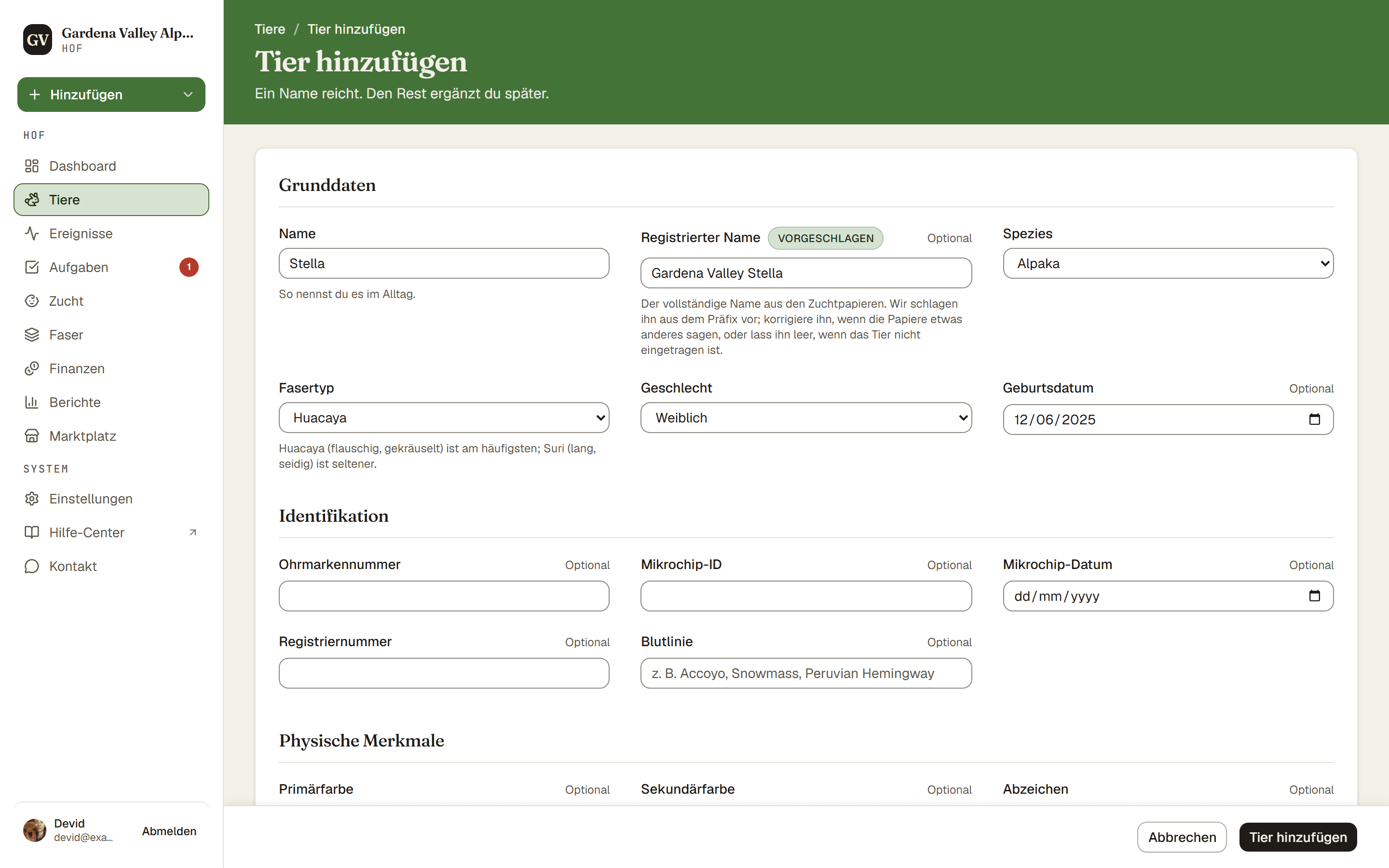
Um ein Tier hinzuzufügen, geh zu Tiere und drücke Tier hinzufügen. Pflicht sind nur der Name und die Spezies. Alles andere kannst du jetzt oder später ausfüllen.
Schritte
- Tiere → Tier hinzufügen. Damit öffnet sich das Formular für ein neues Tier.
- Grunddaten. Gib den Namen ein (den Rufnamen, den du im Alltag verwendest). Daneben steht das Feld Registrierter Name, es ist optional. Während du den Namen tippst, schlägt AlpacaKeep einen registrierten Namen aus dem Namenspräfix deines Hofs vor (aus Einstellungen → Hofprofil) und markiert ihn mit Vorgeschlagen, bis du ihn anfasst. Übernimm den Vorschlag, passe ihn an die Papiere an oder leere ihn, wenn das Tier nicht eingetragen ist. Dann wähle die Spezies (Alpaka oder Lama). Du kannst auch den Fasertyp festlegen (Huacaya oder Suri beim Alpaka, Classic oder Suri beim Lama). Trag Geschlecht und Geburtsdatum ein, wenn du sie kennst.
- Identifikation (optional). Trag die Ohrmarkennummer, Mikrochip-ID, Registriernummer oder die Blutlinie ein. Du kannst jedes davon überspringen und jederzeit nachtragen.
- Physische Merkmale (optional). Lege die Primärfarbe und alle Abzeichen, die Augenfarbe oder die Größe fest.
- Ursprung. Wähle Auf meinem Hof geboren oder Von einem anderen Hof erworben. Das ist wichtig, siehe die Warnung unten.
- Speichern. Drücke Tier hinzufügen. Das Tier öffnet sich auf seiner eigenen Profilseite.
Die Entscheidung, die viele falsch machen: Ursprung
Ursprung sagt AlpacaKeep, wo das Tier gezüchtet wurde, nicht wem es jetzt gehört.
- Auf meinem Hof geboren sagt der App, das Namenspräfix deines Hofs im Feld Registrierter Name vorzuschlagen. Wähle das nur für Tiere, die auf deinem Hof geboren wurden.
- Von einem anderen Hof erworben behält den Namen des Züchters. Wähle das für alles, was du gekauft, geschenkt bekommen oder in Pension genommen hast.
Achtung. Wenn du ein gekauftes Tier als „Auf meinem Hof geboren“ markierst, steht im Feld Registrierter Name dein Präfix vor einem Tier, das du nicht gezüchtet hast. Im Zweifel wähle Von einem anderen Hof erworben. Dazu gibt es einen ganzen Artikel: siehe Ursprung: auf meinem Hof geboren oder erworben?
Wenn du Von einem anderen Hof erworben wählst, erscheint ein Feld Herkunftshof. Wähle einen gespeicherten Kontakt für diesen Hof, und die App schlägt dessen Züchterpräfix im Feld Registrierter Name vor. Tippst du den Namen stattdessen als Text ein, wird kein Präfix vorgeschlagen. Du kannst auch das Zugangsdatum setzen.
Gut zu wissen. Kaufpreis und Versicherungswert liegen im Tab Finanzen des Tiers, dort trägst du sie nach dem Speichern ein. Nur der Inhaber und der Mitbesitzer können sie sehen.
Nach dem Speichern
Das neue Tier startet mit dem Status Aktiv. Von seinem Profil aus kannst du in den verschiedenen Tabs Gesundheitsereignisse, Gewichte, Zucht, Faser und mehr erfassen. Um ein Elterntier hinzuzufügen, das noch nicht auf deinem Hof ist, siehe Eltern verknüpfen.