 AlpacaKeep
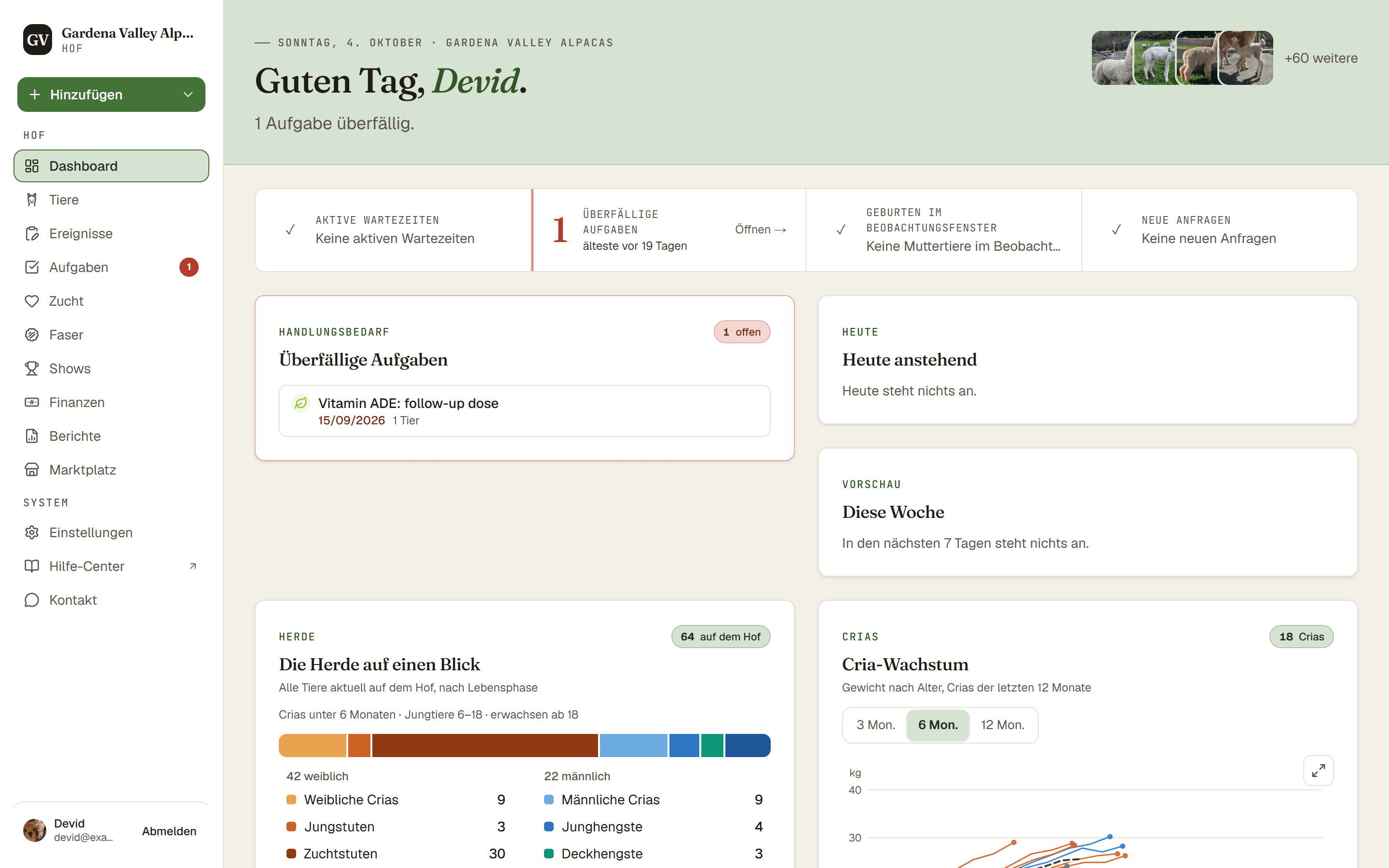
AlpacaKeep ist um ein Hauptmenü an der Seite herum aufgebaut (oder unten am Rand auf deinem Handy). Hier steht, was jeder Teil macht, damit du dich schnell zurechtfindest.
Das Hauptmenü
Der Reihe nach heißen die Menüpunkte:
- Dashboard. Dein Startbildschirm, ein schneller Blick auf das, was Aufmerksamkeit braucht.
- Tiere. Deine ganze Herde. Füge jedes Tier hinzu, sieh es an und bearbeite es.
- Ereignisse. Das Protokoll von dem, was bereits passiert ist, zum Beispiel der Impftag von heute Morgen. Erfasse es für eine Gruppe von Tieren auf einmal.
- Aufgaben. Deine To-do-Liste für alles, was noch ansteht, auch für Aufgaben, die sich wiederholen.
- Zucht. Trächtigkeiten, Anpaarungen und Geburten.
- Faser. Vlies-Laborberichte und Schur für den ganzen Hof.
- Shows. Showtage und Ergebnisse. Dieser Menüpunkt erscheint, sobald dein Hof ein Showergebnis hat.
- Finanzen. Einnahmen und Ausgaben. Das sehen nur Inhaber und Mitbesitzer.
- Berichte. Herdenweite Listen, die du wöchentlich prüfst, etwa Gewichtsverlust.
- Marktplatz. Alles rund um den Verkauf, in vier Tabs: Angebote, dein Öffentliches Profil (Logo, Titelbild und wie du deinen Hof für Käufer beschreibst), die Anfragen von Käufern und das Website-Widget für deine eigene Website.
- Einstellungen. Deine Hof-Einrichtung, dein Team und deine Datenwerkzeuge.
Gut zu wissen. Der Menüpunkt Finanzen ist für Mitarbeiter und Betrachter ausgeblendet. Nur Inhaber und Mitbesitzer sehen Geld. Im Marktplatz gilt dasselbe für die Tabs Öffentliches Profil, Anfragen und Website-Widget.
Was das Dashboard zeigt
Das Dashboard ist dein Überblicksbildschirm. Es bündelt Karten für die Dinge, die dich brauchen: Überfällige Aufgaben, Geburten unter Beobachtung (Muttertiere kurz vor der Geburt) und Gewichtsverlust gemeldet. Oben in der Zählerleiste siehst du außerdem Aktive Wartezeiten. Ganz unten gibt es außerdem eine Karte mit den letzten Aktivitäten. Die meisten Karten blenden sich selbst aus, wenn es nichts zu zeigen gibt, ein ruhiges Dashboard ist also ein gutes Zeichen.
Auf deinem Handy
Auf einem kleinen Bildschirm wandert das Menü in eine Leiste am unteren Rand. Du bekommst schnelle Tabs für Aufgaben, Tiere und Ereignisse, in der Mitte einen runden +-Button zum Hinzufügen (wenn du Änderungen machen darfst) sowie eine Schaltfläche Mehr, hinter der alles andere liegt. Die Schaltfläche Mehr zeigt einen kleinen Hinweispunkt, wenn etwas deine Aufmerksamkeit braucht.
Tipp. Jedes Tier hat sein eigenes Profil mit sechs Tabs (Übersicht, Gesundheit, Zucht, Faser, Aufzeichnungen, Finanzen), sieben, sobald dein Hof Shows einträgt. Finanzen sehen nur Besitzer und Mitbesitzer. Die werden in einem eigenen Artikel erklärt.