 AlpacaKeep
Ereignis erfassen ist ein Fenster, das von der Seite hereingleitet, um festzuhalten, was du gerade erledigt hast: eine Impfung, eine Behandlung, eine Kontrolle. Es ist der eine Startpunkt fürs Erfassen, für ein Tier oder eine ganze Koppel.
So öffnest du es
- Tippe auf Hinzufügen, dann auf Ereignis erfassen. Hinzufügen findest du in der Seitenleiste am Computer und im runden Hinzufügen-Button auf dem Handy.
- Auf der Seite Ereignisse tippe oben auf Ereignis erfassen. Auf dem Handy fehlt dieser Button, nimm dort den runden Hinzufügen-Button.
- Am Tier: Öffne seinen Tab Gesundheit und tippe oben auf Ereignis erfassen. Dieses Tier ist schon ausgewählt.
- Auf der Seite Tiere: Hake die Tiere an (auf dem Handy tippst du zuerst auf Auswählen) und tippe in der Leiste unten auf Ereignis erfassen. Sie sind schon ausgewählt und bleiben für die nächste Arbeit angehakt.
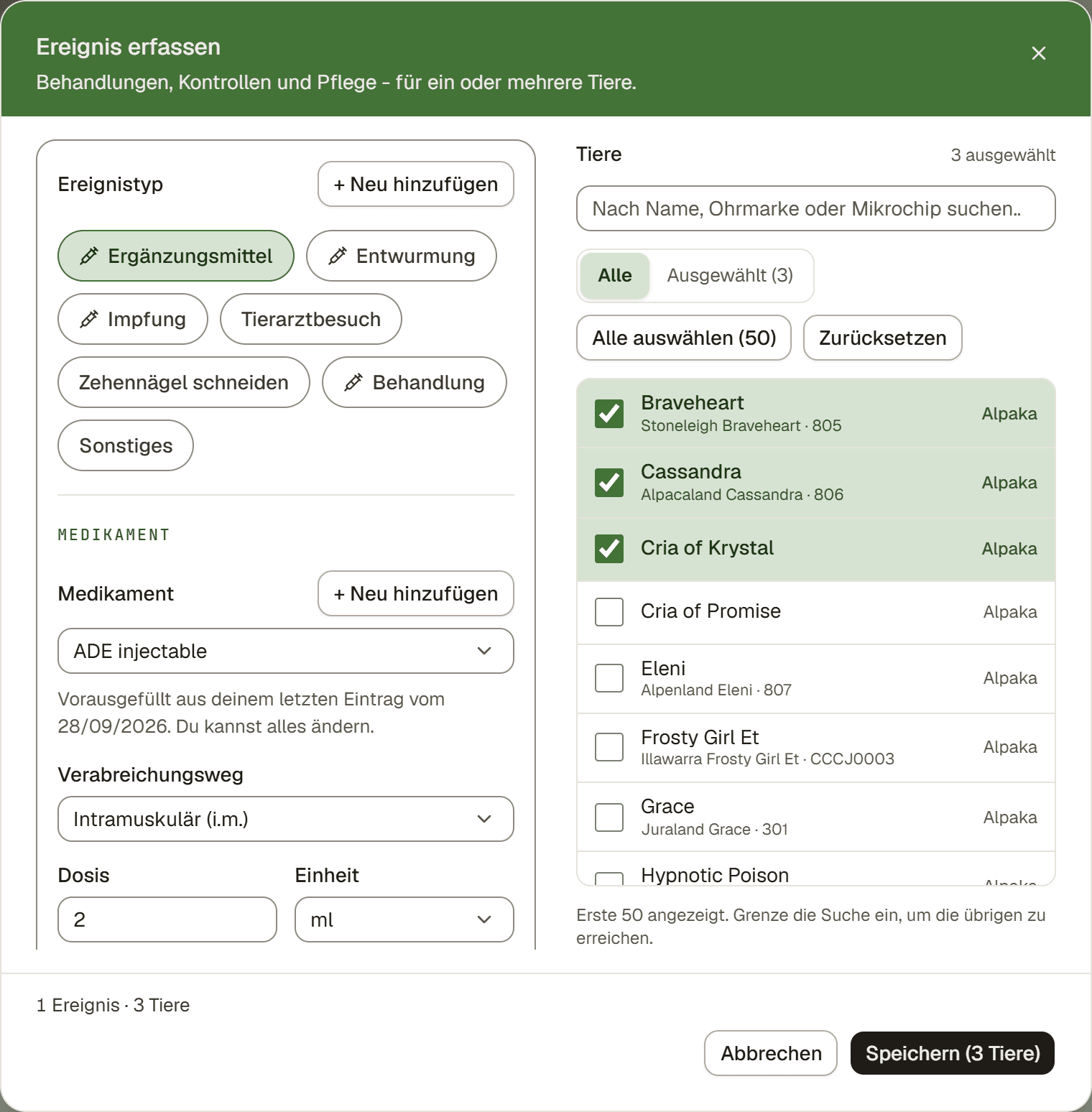
Schritte
- Wähle den Ereignistyp. Die Auswahl ist danach sortiert, was dein Hof am häufigsten erfasst.
- Wähle die Tiere. Auf dem Handy tippst du auf die Zeile Tiere, um die Auswahl zu öffnen. Filtere nach Koppel, suche, oder nimm Alle auswählen, dann tippe auf Fertig.
- Prüfe die Details. Medikament und Verabreichungsweg sind aus dem letzten Ereignis dieses Typs auf deinem Hof vorausgefüllt, mit einem Hinweis, von welchem Datum sie stammen. Die Dosis ist ebenfalls vorausgefüllt, außer das Medikament wird nach Körpergewicht dosiert. Du kannst alles ändern. Chargennummer und Verfallsdatum werden nie übernommen. Gibt es kein früheres Ereignis, aber deine Bibliothek hat genau ein passendes Medikament, wird es für dich ausgewählt, und den Verabreichungsweg wählst du selbst.
- Mehr als eine Sache erledigt? Tippe auf "+ Noch etwas erfassen" und erfasse das nächste Ereignis, bis zu 4 in einem Speichern. Ein fertiges Ereignis klappt zu einer Zeile zusammen. Tippe auf die Zeile, um es zu bearbeiten.
- Speichern. Alles wird zusammen gespeichert. Direkt danach zeigt das Fenster einen Button Rückgängig, und dieses eine Rückgängig entfernt alles. Jedes Ereignis erscheint außerdem als eigene Zeile auf der Seite Ereignisse.
Eine Dosis für jedes Tier
Bei einem Medikament, das nach Körpergewicht dosiert wird, berechnet das Fenster die Dosis jedes Tieres aus seinem Gewicht am Datum des Eintrags. Eine Zeile zeigt die Summe, zum Beispiel "5 Tiere · 40,4 mg gesamt". Tippe auf Dosen, dann siehst du jedes Tier mit seiner Dosis und seinem Gewicht. Überschreib eine Dosis, um sie zu ändern.
Eine Zeile ohne Dosis sagt dir, warum, und bietet eine schnelle Lösung:
- Kein Gewicht bis zu diesem Datum: Trag die Dosis ein, oder tippe auf die Zeile und gib neben Etwa ein geschätztes Gewicht ein. Die Schätzung gilt nur für diese Dosis. Sie wird nie als Gewicht gespeichert.
- Ein Gewicht, das für das Alter des Tieres zu alt ist: Das Gewicht eines Crias gilt nur zwei Wochen. Mit zum Beispiel 11,2 ml verwenden nimmst du die Dosis trotzdem aus diesem Gewicht. Fehlt das Geburtsdatum, tippe auf Geburtsdatum eintragen.
- Gleiche Dosis für alle füllt alle leeren Zeilen auf einmal.
Ist die Dosis für alle Tiere gleich, trägst du sie einmal ein. Mit Andere Dosis für einige Tiere gibst du einem Cria weniger.
Speicherst du mit Tieren ohne Dosis? Dann fragt das Fenster erst nach. Tippe auf Dosen eintragen, oder auf Trotzdem speichern, wenn du die Dosis noch nicht kennst.
Tipp. Keine Waage? Richte das Medikament als Gleich für alle Tiere ein, mit der Dosis deines Tierarztes für ein erwachsenes Tier. Dann wird sie für jedes Tier ausgefüllt. Siehe Deine Medikamentenbibliothek und dein Medikamentenschrank (Bestand).
Wenn der Tierarzt es verschrieben hat
Meist entscheidest du selbst über eine Behandlung, deshalb bleiben die Felder für die Verschreibung versteckt. Hat der Tierarzt das Medikament verschrieben, setz den Haken bei Vom Tierarzt verschrieben und trag ein, was du hast: Verschrieben von (Name und Telefon des Tierarztes), die Nr. der Verschreibung, falls das Blatt eine hat, und ein Foto oder Scan davon. Eine Datei gilt für alle Tiere dieses Ereignisses, und nichts davon wird in deinen nächsten Eintrag übernommen.
Nach dem Speichern
Die Bestätigung behält die Behandlung und leert die Tiere, bereit für die nächste Koppel. Tippe auf Gleiche Tiere, etwas anderes, um stattdessen eine zweite Sache für dieselbe Gruppe zu erfassen.
Gut zu wissen
Gut zu wissen. Fenster aus Versehen geschlossen, weil du daneben getippt hast? Nichts geht verloren. Öffne es wieder und dein Eintrag ist noch da, mit einem Verwerfen-Button, falls du ihn nicht willst. Nur Abbrechen wirft den Eintrag weg.
Achtung. Exterieurbeurteilungen und Erinnerungen an Folgedosen brauchen stattdessen die Seite Detaillierte Erfassung. Öffne sie mit dem Link unter + Noch etwas erfassen, der deine Tiere mitnimmt, oder auf der Seite Ereignisse im Menü ⋯ mit Detailliert erfassen. Siehe Detaillierte Erfassung: die großen Arbeiten für eine ganze Gruppe.