 AlpacaKeep
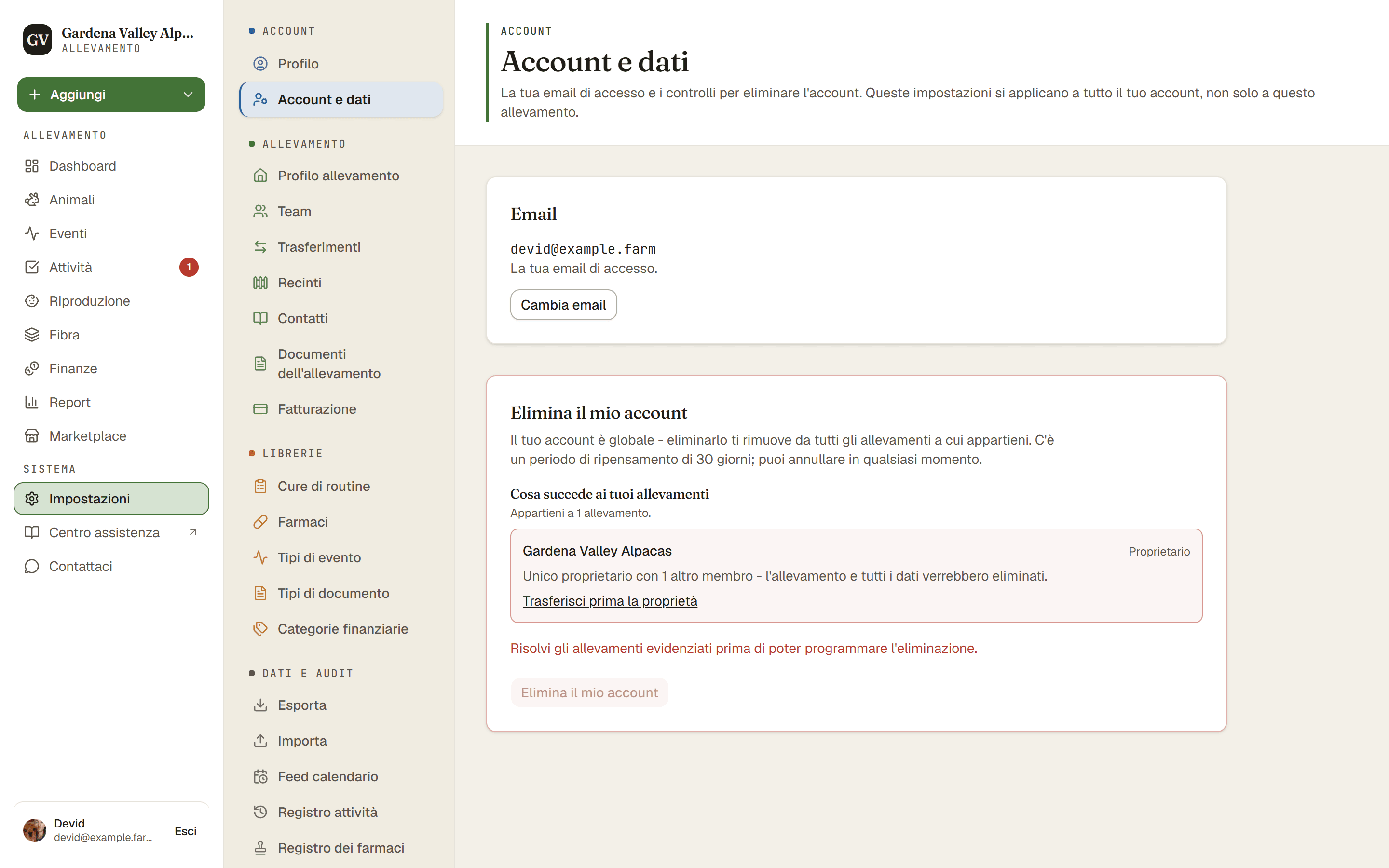
Il tuo account e le impostazioni dei tuoi dati si trovano in Impostazioni → Account e dati. È qui che chiedi di cancellare il tuo account. La cancellazione non avviene subito: hai 30 giorni per cambiare idea.
Il tuo account vale per tutti gli allevamenti
Il tuo account è un unico accesso che può appartenere a più di un allevamento, quindi cancellarlo ti rimuove da ogni allevamento di cui fai parte. Per allontanarti da un solo allevamento, lascialo dalle impostazioni del suo team e mantieni il tuo account.
Anche gli allevamenti di cui sei proprietario vengono cancellati
Cancellare l'account cancella anche ogni allevamento di cui sei l'unico proprietario e in cui non c'è nessun altro membro. Cioè tutto l'allevamento e tutto ciò che contiene: animali, foto, documenti e movimenti finanziari. Non ne teniamo nessuna copia per te, quindi se ti servono quei dati (per esempio per le tasse), esportali prima. La pagina Account e dati elenca ciascuno dei tuoi allevamenti e ti dice cosa succederà.
Se in un allevamento di cui sei proprietario ci sono altri membri, non puoi ancora programmare la cancellazione. Prima trasferisci la proprietà a qualcuno di quell'allevamento, oppure rimuovi gli altri membri. Se qualcuno entra in quell'allevamento durante i 30 giorni, la cancellazione resta in attesa: non viene eliminato nulla, la pagina Account e dati ti dice perché, e la cancellazione va avanti quando l'allevamento è stato trasferito o quelle persone se ne sono andate.
Allevamenti condivisi
Gli allevamenti in cui sei Co-proprietario, Operaio agricolo o Visualizzatore restano al loro proprietario. Vieni rimosso come membro e il tuo nome viene tolto. Le registrazioni che hai inserito, come eventi e pesi, restano a quell'allevamento, perché fanno parte della storia del suo gregge.
Come funziona la cancellazione
- Impostazioni → Account e dati. Cerca l'opzione per cancellare l'account.
- Elimina il mio account. Scrivi DELETE MY ACCOUNT nella casella, poi conferma con Programma eliminazione. Questo avvia i 30 giorni di ripensamento. Non viene ancora rimosso nulla.
- Aspetta, oppure annulla. Puoi annullare la richiesta in qualsiasi momento entro quei 30 giorni e non cambia nulla.
- Dopo 30 giorni, la cancellazione parte nel nostro successivo passaggio notturno. Il tuo account, i tuoi dati personali e gli allevamenti di cui sei l'unico proprietario vengono rimossi. Foto e documenti possono impiegare qualche giorno in più per sparire dal nostro archivio file.
- Controlla la tua email. Ti scriviamo quando è tutto fatto.
Cosa resta
- I messaggi che hai inviato ai venditori restano a loro, senza il tuo nome né la tua email.
- Se ricevevi la nostra newsletter, il tuo indirizzo resta segnato come disiscritto, così non ti scriviamo più.
- Dove la legge lo richiede, la documentazione di un contratto a pagamento.
- Se un allevamento ti ha nella sua rubrica, per esempio come acquirente, quel contatto appartiene all'allevamento. Chiedi a lui di modificarlo.
- I backup del nostro database ne conservano una copia per al massimo altri 7 giorni.
Buono a sapersi. Non fai parte di nessun allevamento? Puoi comunque cancellare il tuo account. Dopo l'accesso, la pagina che ti propone di creare un allevamento ha anche la sezione Elimina il mio account.
Suggerimento. Vuoi prima una copia dei tuoi dati? Esportali prima di cancellare. Vedi Porta fuori i tuoi dati (esportazione).