AlpacaKeep
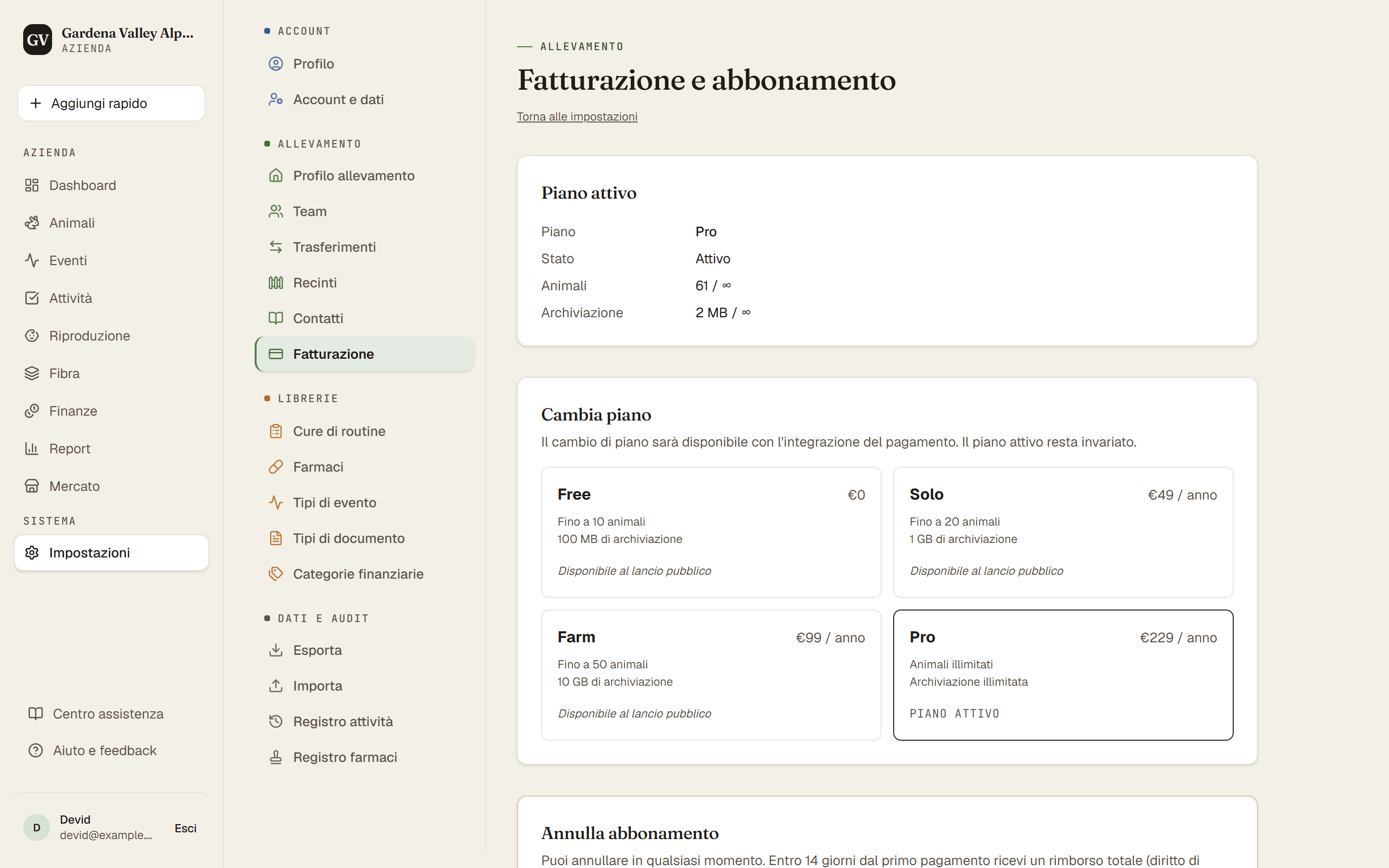
AlpacaKeep ha quattro piani: Free, Solo, Farm e Pro. A ogni livello superiore aumenta il numero di animali che puoi seguire e si sbloccano più funzioni. Puoi vedere il tuo piano attuale e i limiti esatti in qualsiasi momento su Impostazioni → Fatturazione.
Come sono fatti i piani
- Free il piano di partenza, senza costi.
- Solo più animali e membri del team illimitati. (L'importazione da foglio di calcolo è gratis con ogni piano.)
- Farm ancora più animali, e aggiunge la sezione Fibra (analisi della fibra per tutto l'allevamento), le pagine di vendita pubbliche e la contabilità completa: report di entrate e uscite, ricevute sui movimenti, suddivisione di un costo su più animali e categorie personalizzate.
- Pro la massima capacità, per allevamenti più grandi.
I tuoi numeri esatti (animali, membri del team, spazio, prezzo) sono su Impostazioni → Fatturazione.
Finanze nel piano gratuito. Registrare entrate e uscite, ed esportarle in CSV, è incluso in ogni piano. Farm aggiunge report, ricevute, suddivisione dei costi e categorie personalizzate.
Buono a sapersi. Gli animali di riferimento non contano nel tuo limite di animali. Sono voci solo per il pedigree, usate per antenati e stalloni esterni di altri allevamenti, così puoi costruire un pedigree senza consumare il tuo piano.
Scegliere un piano
Impostazioni → Fatturazione inizia con Il tuo allevamento oggi: i tuoi animali e i cria in arrivo, lo spazio, le persone (contano anche gli inviti in sospeso) e le pagine pubbliche. Sotto trovi i quattro piani, annuale (circa 2 mesi gratis) o mensile, IVA inclusa. I piani a pagamento aprono al lancio pubblico; fino ad allora puoi confrontarli.
- Il piano più piccolo adatto al tuo allevamento è segnalato e ha il pulsante pieno.
- Un piano che non basta dice perché, per esempio "Fino a 50 animali. Tu ne hai 64."
- Se un piano spegnerebbe qualcosa che usi, lo dice, per esempio "Le tue pagine pubbliche vanno offline".
- Quando scegli vedi prima un breve riepilogo: piano, prezzo, quando paghi, cosa cambia oggi. Spunta la casella che chiede di far partire subito il piano, tocca Ordine con obbligo di pagare, poi paghi con Stripe.
Se il tuo allevamento è nella beta
Gli allevamenti della beta usano gratis un piano a pagamento fino a una data di fine che annunciamo con almeno 30 giorni di anticipo. Una volta annunciata, la pagina Fatturazione la mostra e puoi scegliere un piano.
- Dopo quella data il tuo allevamento passa al piano Free, a meno che tu non abbia scelto un piano.
- Se scegli prima, il piano parte subito. Paghi solo dopo quella data.
- Cambi idea? Se annulli prima della data non paghi nulla.
- Il giorno prima della data e nella data stessa non puoi scegliere un piano. Scegli prima, oppure dal giorno dopo.
La prova gratuita
Puoi provare tutto gratis per 30 giorni. La prova sblocca ogni funzione a pagamento e toglie ogni limite finché dura. Fanno eccezione le richieste IA: 10 al mese durante la prova.
- È una prova gratuita per allevamento, per chi è sul piano Free o Solo. La beta vale come prova gratuita: un allevamento che era nella beta non può avviarla.
- Non parte alla registrazione. Parte quando tocchi un blocco a pagamento, per esempio quando arrivi alla sezione Fibra, al Marketplace o al tuo limite di animali. Vedrai un pulsante Prova tutto gratis per 30 giorni.
- Nessuna carta richiesta.
- Dopo 30 giorni torni automaticamente al piano che avevi prima. Tutto quello che hai inserito resta.
Oltre il limite di un piano
Non viene eliminato nulla e puoi ancora vedere e modificare tutto. Si ferma solo l'aggiunta di animali, o il ritorno di un animale nel conteggio: ripristinare un animale archiviato, annullare una vendita o un decesso, il rientro da un prestito, trasformare un animale di riferimento in un animale del gregge, o accettare un trasferimento. Le nascite si registrano sempre, anche un po' oltre il limite. Passa a un piano più grande, o rientra nel limite, e tutto torna a funzionare.
Annullare, e i tuoi 14 giorni per ripensarci
Solo il proprietario dell'allevamento può annullare: Impostazioni → Fatturazione → Annulla abbonamento.
- Entro 14 giorni dalla scelta di un piano a pagamento, il piano finisce subito, l'allevamento passa al piano Free e ti rimborsiamo tutto quello che hai pagato.
- Dopo 14 giorni, il piano resta fino alla fine del periodo già pagato, poi passa al piano Free. Nessun rimborso.
- Hai scelto un piano durante la beta? Non ti è stato addebitato nulla, quindi il piano resta semplicemente fino alla data di fine.
- Non viene eliminato nulla. Ti mandiamo un'email con la data e l'ora in cui abbiamo ricevuto la disdetta.
Buono a sapersi. Puoi farlo anche senza accedere. In fondo a ogni pagina del nostro sito trovi Recedere dal contratto qui e Disdici i contratti qui. Ricevi subito un'email, poi troviamo noi il tuo abbonamento e lo chiudiamo.
Passi
- Impostazioni → Fatturazione. Vedi il tuo allevamento oggi e il piano adatto.
- Scegli un piano, controlla il riepilogo e paga con Stripe. Oppure tocca un blocco a pagamento (o la scheda della prova nella pagina Fatturazione) per avviare la prova gratuita.