 AlpacaKeep
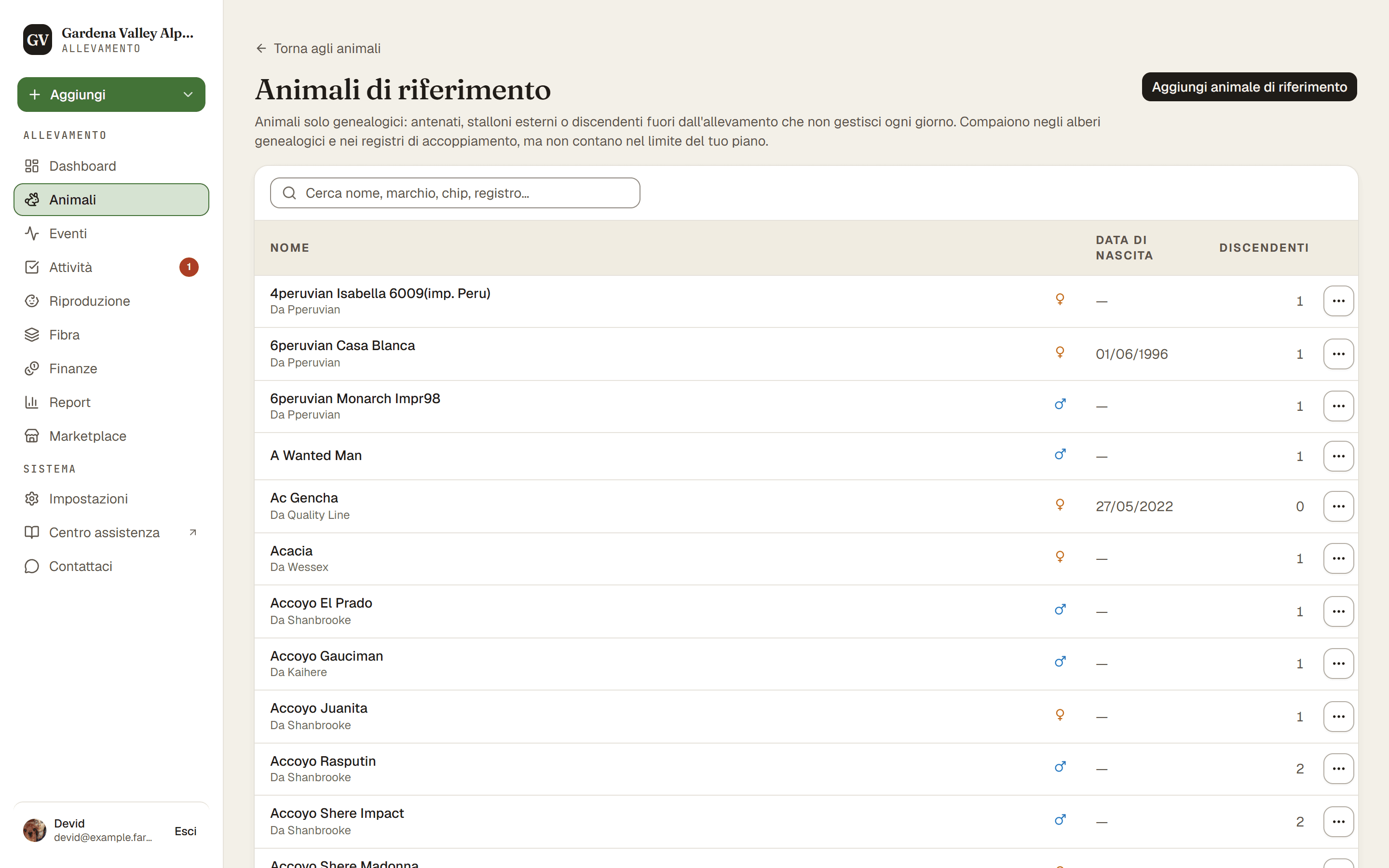
Un animale di riferimento è una voce di pedigree leggera per un animale che vuoi nei tuoi alberi genealogici ma che non gestisci. Non conta nel limite di animali del tuo piano, quindi puoi aggiungerne quanti ti servono.
Quando usarne uno
Aggiungi un animale di riferimento quando vuoi un animale nei tuoi pedigree e nel calcolo della consanguineità (COI), ma non ne registrerai la vita di ogni giorno:
- Uno stallone esterno di un altro allevamento che ha coperto una delle tue fattrici.
- Un antenato deceduto che non hai mai posseduto ma che vuoi nell'albero genealogico.
- Parenti fuori dall'allevamento, come un cria che hai venduto o un genitore in un altro allevamento.
Se hai solo un nome e nulla più, puoi semplicemente digitarlo. Vedi Collegare i genitori.
Usare uno stallone di un altro allevamento
Dipende da dove vive lo stallone:
- Porti le tue femmine da lui, o viene da te per la giornata. È uno stallone esterno. Nel modulo della monta premi + Stallone esterno accanto a Stallone e scrivi il suo nome. Viene salvato come animale di riferimento insieme alla monta. Vedi Registrare una monta.
- Vive per un periodo nel tuo allevamento, anche se in affitto. Aggiungilo al tuo gregge come un animale normale con Acquisito da un altro allevamento, e spunta Usa per la monta (stallone).
Non usi più uno stallone esterno? Apri la sua pagina (Animali → ⋯ → Animali di riferimento, poi lo stallone) e premi Togli dall'elenco nella scheda Elenco dei padri. Non lo elimina mai: resta in ogni pedigree e + Stallone esterno lo trova ancora. Se lo usi di nuovo da lì torna nell'elenco, oppure premi Rimetti nell'elenco.
Perché non pesa sul tuo piano
Il tuo piano limita quanti animali tracciati puoi seguire. Un riferimento è un abbozzo, non un animale completo, quindi è escluso da quel conteggio. Aggiungere un riferimento per un famoso stallone esterno non ti farà mai superare il limite di animali.
Buono a sapersi. I riferimenti restano gratuiti su ogni piano, e non c'è nessun tetto a quanti puoi aggiungerne.
Dove stanno i riferimenti
Apri Animali, poi Animali di riferimento nel menu ⋯ della pagina. Da lì puoi aggiungere un nuovo riferimento o modificarne uno esistente. Il modulo del riferimento è breve apposta: nome, specie, sesso, data di nascita, colori, allevamento di provenienza e note. E, se li conosci, il padre e la madre del riferimento stesso, così puoi costruire un albero più profondo.
Buono a sapersi. Non puoi eliminare un riferimento finché è ancora indicato come genitore di un animale tracciato o usato in un record di monta. Scollegalo prima, oppure lascialo: i riferimenti sono gratuiti.
Promuovere o retrocedere in seguito
Un riferimento non è un vicolo cieco:
- Aggiungi al gregge trasforma un riferimento in un animale tracciato completo, dalla sua pagina di modifica. Ti chiede da dove arriva: Da un altro allevamento (indica l'allevamento e la data di ingresso, così nel registro di stalla compare come ingresso) oppure Nato nel mio allevamento (compare come nato qui, senza data di ingresso). Puoi anche segnare un maschio come Stallone da monta e, se l'hai comprato, indicare il prezzo di acquisto. Questo ricontrolla il limite del tuo piano (perché ora conta) e mantiene intatto ogni collegamento tra genitori.
- Si può aggiungere solo un riferimento ancora vivo e presso di te. Uno registrato come morto, venduto o trasferito resta parte della genealogia: la pagina di modifica lo spiega al posto del pulsante.
- Se lo stesso animale è già nel tuo gregge, la finestra ti avvisa. In quel caso unisci il riferimento all'animale del gregge dall'elenco dei riferimenti, invece di aggiungerlo due volte.
- Converti in riferimento riporta un animale tracciato a riferimento, dal menu ⋯. Funziona solo se l'animale non ha ancora storico, come eventi, pesi o record di monta. Per un animale appena aggiunto da un riferimento conta solo quello che hai registrato da allora, e la conversione ripristina provenienza, data di ingresso e stallone da monta com'erano.
Attenzione. Promuovere un riferimento aggiunge uno al tuo conteggio di animali. Se sei già al limite del tuo piano, dovrai prima passare a un piano superiore o liberare un posto.