 AlpacaKeep
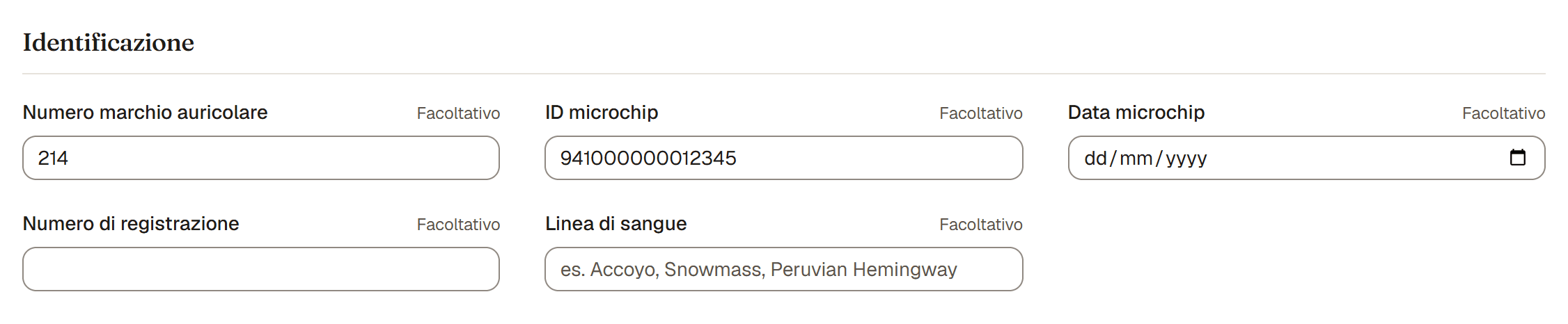
Quando aggiungi o modifichi un animale, la sezione Identificazione raccoglie i modi ufficiali per dargli un nome e ritrovarlo. Sono tutti facoltativi, i numeri e i nomi sono ricercabili, e puoi aggiungerli in qualsiasi momento.
I campi
- Numero marchio auricolare. Il numero stampato sul marchio, o il numero da stalla che usi ogni giorno. Spesso è il modo più veloce per trovare un animale al volo.
- ID microchip. Il numero del chip sotto la pelle. C'è anche una Data microchip per quando è stato impiantato. Il chip è l'identificativo più affidabile per tutta la vita.
- Numero di registrazione. Il numero del registro di razza a cui l'animale è iscritto.
- Nome registrato. Il nome completo sui documenti di registrazione, mostrato ovunque l'animale compaia (lista del gregge, profilo, pedigree, pagina di vendita, PDF). Si trova accanto al Nome di tutti i giorni, nella sezione Informazioni di base, e viene precompilato con il Prefisso nel nome del tuo allevamento come suggerimento mentre digiti il Nome; modificalo se i documenti dicono altro, o lascialo vuoto se l'animale non è registrato. Per esempio, il Nome di tutti i giorni può essere "Willow" mentre il Nome registrato è "Gardena Valley Willow's Frost".
- Linea di sangue. La linea di fondazione, come Accoyo o Snowmass. C'è un articolo dedicato; vedi Linea di sangue e tipo di fibra.
Buono a sapersi. Nessuno di questi campi è obbligatorio per salvare un animale. Inserisci quello che hai ora e completa il resto quando arrivano i documenti.
Suggerimento. Poiché i numeri sono ricercabili, inserire il microchip o il marchio auricolare ti permette di richiamare l'animale giusto da una lettura dello scanner o da un numero da stalla in pochi secondi.