 AlpacaKeep
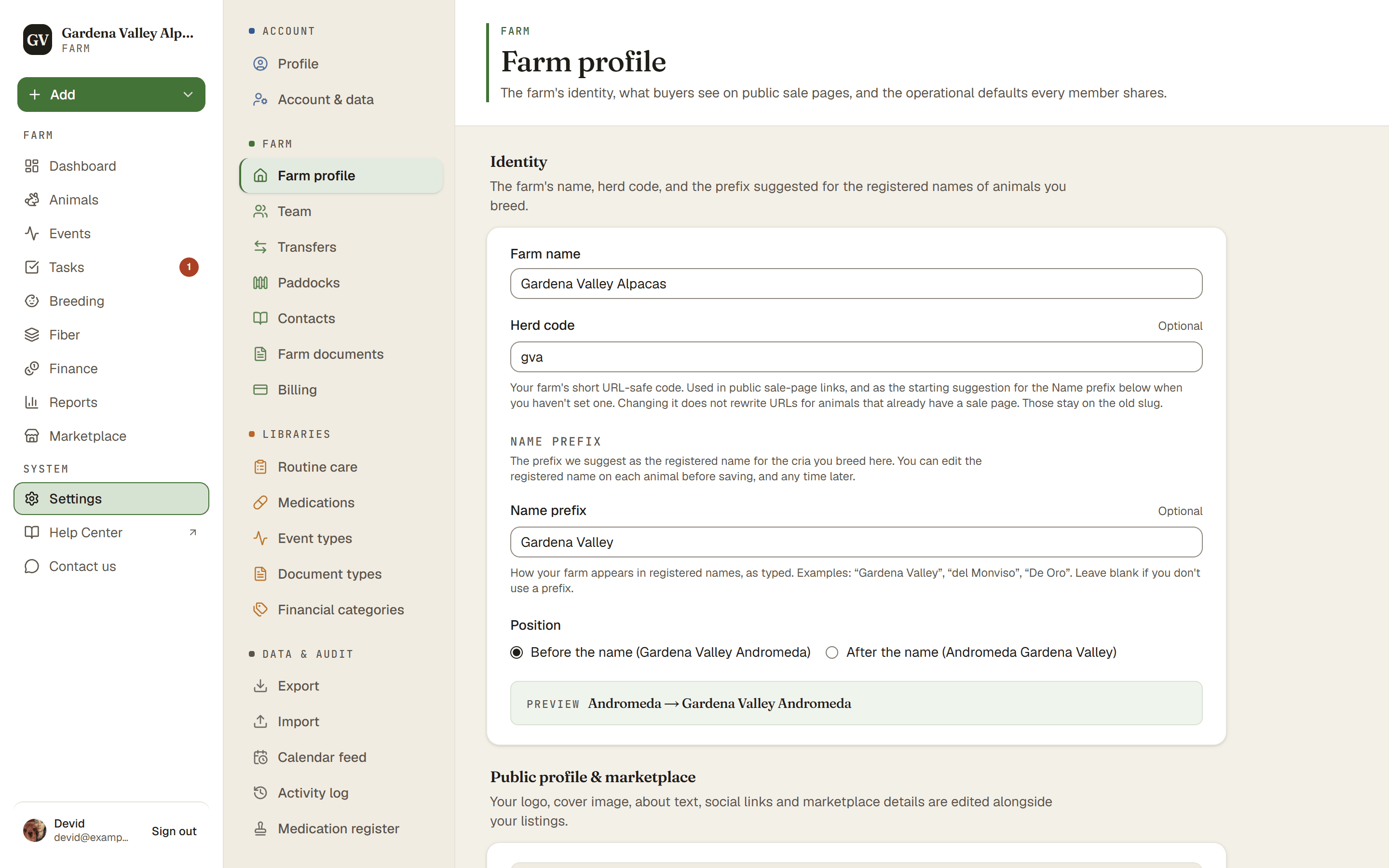
Your farm has two prefix settings in Settings → Farm profile. The Herd code is a short code for your farm, usually 3 to 5 letters. The Name prefix is the readable version AlpacaKeep suggests when it fills in an animal's Registered name field. Alongside them you set the Position: whether the name prefix goes before or after the animal's name.
The concept
Two related settings: a short code for your farm, and the readable prefix for names.
The Herd code is your farm's short label, kept simple: lowercase letters, numbers and hyphens. When you create your farm, its upper-cased form (like "GVA") becomes your first Name prefix. After that, the app uses it to spot registered names that already carry your farm's code, so a suggestion never adds a second prefix. It does not have to be unique: another farm can use the same code.
The Name prefix is the human-readable version, typed exactly as you want it. AlpacaKeep uses it to suggest an animal's registered name when you add or edit an animal, and to pre-fill the cria's registered name on the birth form. Nothing is added to a name automatically after you save. What you save is what shows everywhere.
The Position tells the app whether the name prefix goes at the start or the end of the name.
Example. Say your Herd code is gva, your Name prefix is
"Gardena Valley", and your Position is "before the name". When you type
"Braveheart" as a cria's Name, the app suggests "Gardena Valley Braveheart" in
the Registered name field beside it. You can accept the suggestion, edit it,
or clear it before you save.
Name prefix, or leave it blank
The Name prefix is optional. If you don't set one, the Registered name field starts empty and you fill it in from the papers. If you do set one, the app writes the suggestion into the field for you and marks it Suggested while it is untouched. The moment you edit the field, the Suggested marker goes away and the value is yours to keep.
Watch out: changing a prefix later
Watch out. Changing your Herd code does not change your Name prefix or any sale page's web address. A sale page's address is made from the animal's name once and stays put, so links you shared and QR codes you printed keep working.
Changing your Name prefix or its Position does not touch animals you have already saved either. After you save the setting, the app offers a one-click banner: N animals still carry "old prefix" in their registered name. Update them to "new prefix"? It re-stamps only the registered names that still match the old suggestion. Names you edited by hand are never changed by the banner.
The same banner appears when you edit a farm contact's breeder prefix, for the animals you imported from that breeder.
Good to know
Good to know. The Name prefix is only suggested for animals whose origin is Bred on my farm. For an animal marked Acquired from another farm, the app suggests the breeder's prefix instead, from the saved Source farm contact. If no source contact is picked, no prefix is suggested and the field starts empty. See Origin: bred here or acquired?