 AlpacaKeep
The mating recommender ranks your own animals so you can see good pairings at a glance. Go to the Breeding hub, open the Plan tab, and pick a dam (or a sire). AlpacaKeep lists ranked candidates from your herd, flags inbreeding, and warns about risky color crosses. It is one part of the breeding tools on the feature overview.
How it works
You choose one animal, and the recommender scores every suitable mate on your farm. Each candidate gets a card with an overall ranking plus a breakdown, so you can see why one match sits above another. It also shows the COI (coefficient of inbreeding, the inbreeding percentage) and raises a flag if a pairing is a risky color cross.
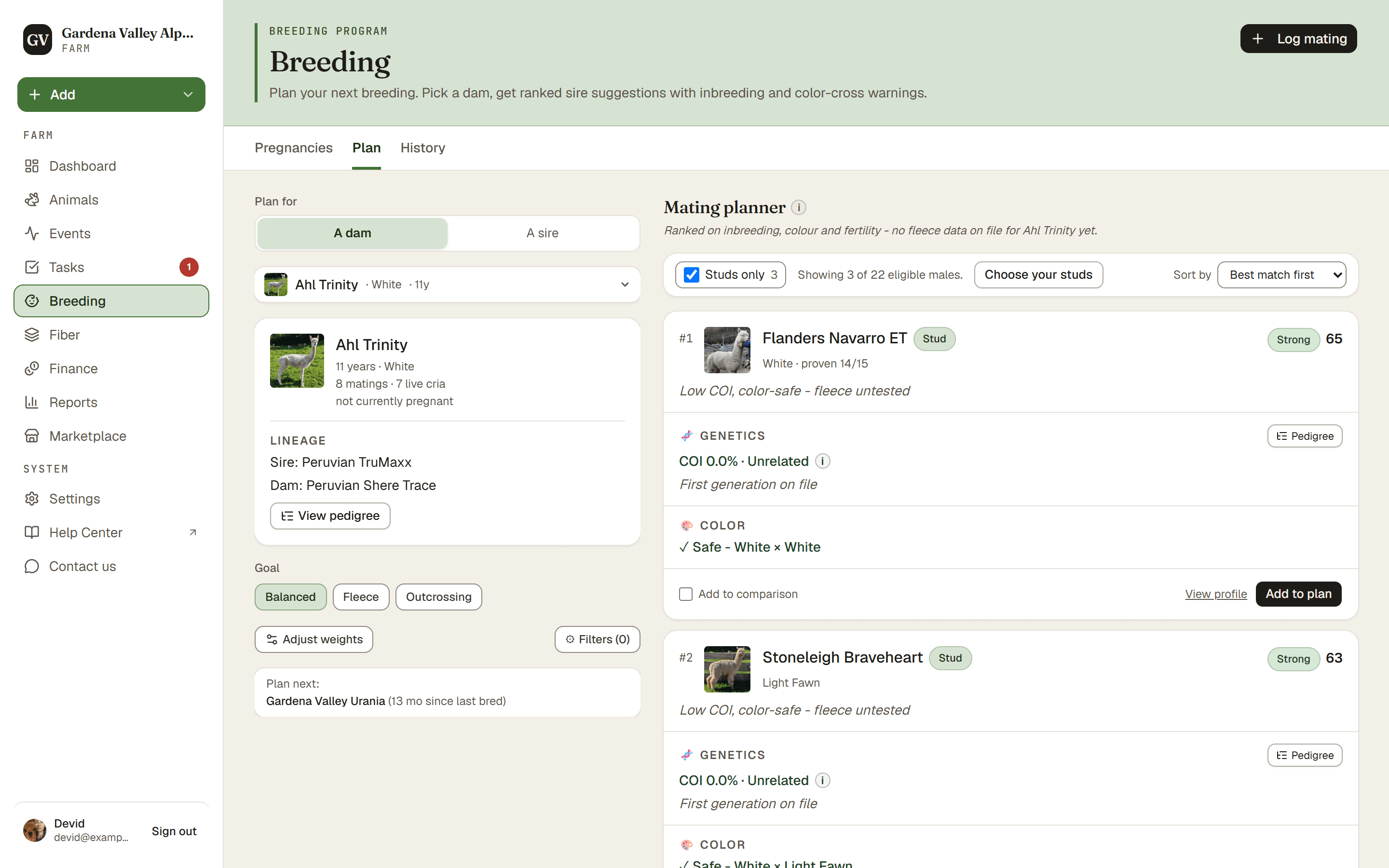
Set the goal
A goal preset decides what the ranking cares about most:
- Balanced (the default) weighs all the traits together.
- Finer fiber leans toward fineness and even fiber.
- Fresh bloodlines leans toward less related animals and safe colors.
- Open Adjust weights and move the sliders to set your own mix. The goal chip then reads Custom.
The planner remembers the last preset you picked on this farm. A custom mix is not kept.
Behind the presets are five sliders. Move them to tell the recommender what matters to you:
- Fineness: the micron you can expect from this pairing's crias, worked out from both parents' fiber tests (corrected for age) and from their tested crias. On a farm with fewer than five animals of the same species and fiber type with a usable test (from nine months of age, with a birth date on file), it uses each candidate's latest test instead.
- Uniformity: how even the fiber is, shown as the CV. Lower is better. It is worked out from both parents' CV tests and their tested crias' CV, at nine months and up (the CV is not corrected for age).
- Low inbreeding
- Color safety
- Fertility
Raise a slider and that trait counts for more in the ranking. The sliders are relative: each one shows its share of the total, like 33%, and only those shares matter.
A single cria cannot be predicted. The fineness estimate is an average for the pairing, shown with a band, and it compares animals within your farm only.
On each card, Crias' fineness is the average micron expected for this pairing, with the range most crias fall in at their second fleece, and Crias' uniformity is their expected CV. Under them the evidence reads thin, fair or solid: tap Details to see the tests and tested crias behind the estimate and the candidate's latest test as entered. When you pair a Suri with a Huacaya, the estimate is for crias of the dam's type, and the card reminds you that a cria can be either type. A llama gets no fiber estimate for an alpaca, and the other way round. A test taken before nine months of age, or on an animal with no birth date, is not used; add the birth date where it is missing, and a later test counts once the animal is older.
Keep a shortlist
Found a pairing you like? Press Add to shortlist on the card. Your list is called My shortlist and only you can see it. Nobody else on the farm sees a pair until you confirm it.
- Each female can be on the list with one male. If you add her with another male, the new pair replaces the old one (the button then reads Replace). Her card says On your shortlist with the male's name.
- Open My shortlist and press Details on a row to see the full pairing card again. Choose another male for her takes you back to the planner.
- Add a note under a pair to say why you chose it (up to 500 characters). It stays private like the rest of your list, and your team sees it once you confirm.
- Tick the pairs you want to confirm now. Every pair that can be confirmed starts ticked. Pairs you untick, and pairs that cannot be confirmed yet, stay on your list.
- When you are ready, confirm. You are asked Today or earlier or Planned for later. For a later day, pick a date from tomorrow up to one year ahead. Every pair gets that date, and you can change each one later with Edit mating on the Pregnancies tab.
- Confirming records the pairs as matings that the whole team sees on the Pregnancies tab. Planned ones wait under Planned matings, on top of the tab. Each one says who planned it, any note, and, when it came from the recommender, which animal the search started from and the goal. Details opens the pairing card for the whole team, worked out with today's data. Delete plan, in the row's ⋯ menu, removes one if your plans change. You can Undo right after, and the pairs come back to your list.
- A row tells you why a pair cannot be confirmed yet: she is pregnant, she has an unconfirmed or planned mating, or one of the two animals is gone. A known lethal color cross shows in red, and you are asked to accept the risk before you confirm.
- A Viewer can keep a list but cannot confirm it. On a phone, the My shortlist button sits above the bottom menu.
Good to know. The recommender only ranks your own males and females. Outside studs from other farms are not ranked. To breed to one, open Log mating and pick him under Outside studs, or add him with + Outside stud.
The exact scoring math is internal, but the idea is simple: it rewards the traits you turned up, penalizes high inbreeding, and warns you about color crosses, so the safest, strongest matches rise to the top. A pairing with a COI of 12.5% or more (close mating) is never called Strong, however well it scores.