 AlpacaKeep
When you log a medication, you can set up the next dose at the same time. AlpacaKeep turns it into a reminder task so you do not forget the booster or the rest of a course.
Where to find it
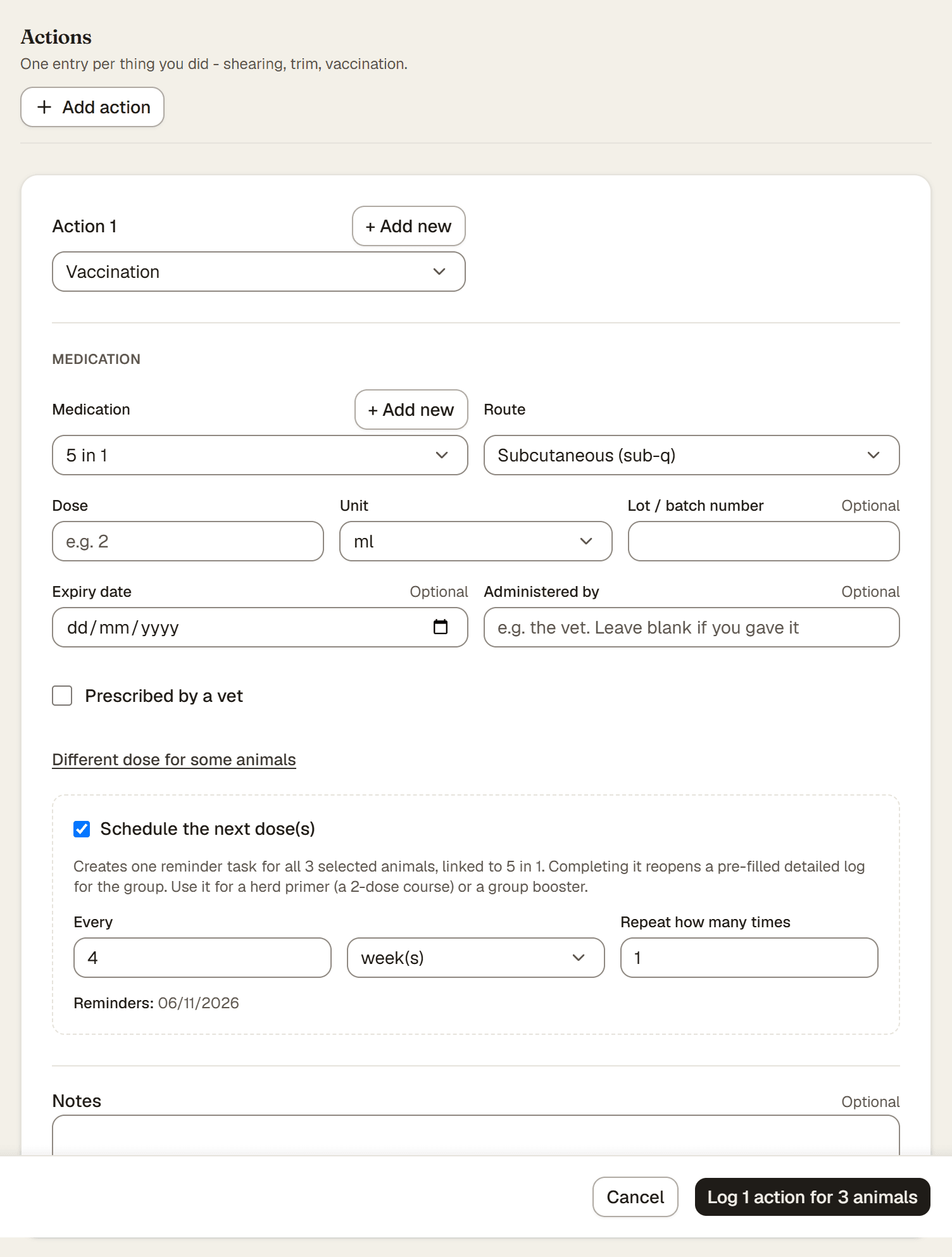
Follow-up doses are set on the Detailed log: on the Events page, open the ⋯ menu and choose Detailed log. Each medication you add there has its own Schedule the next dose(s) checkbox. It is off until you tick it.
Steps
- Log the medication event on the detailed log as usual.
- Tick Schedule the next dose(s).
- Set Every and the unit. For example every 3 weeks.
- Set Repeat how many times. This is how many follow-up doses you need: one for a single booster, more for a course.
- Save with the button at the bottom. It counts what you log, for example Log 1 action for 3 animals. AlpacaKeep creates the reminder task for you.
What you get
A follow-up creates one task linked to the same animals and the same event type. When the task comes due and you mark it complete, it reopens a pre-filled event form, so logging the next dose is quick.
Good to know. Email reminders are not switched on yet. For now the task itself is your reminder. Keep an eye on your Tasks list and the dashboard so a due dose does not slip by.
Watch out. Each medication has its own follow-up, so logging a vaccine and a dewormer together can schedule two separate reminders. The Log an event drawer has no follow-up option: open the detailed log for it.