 AlpacaKeep
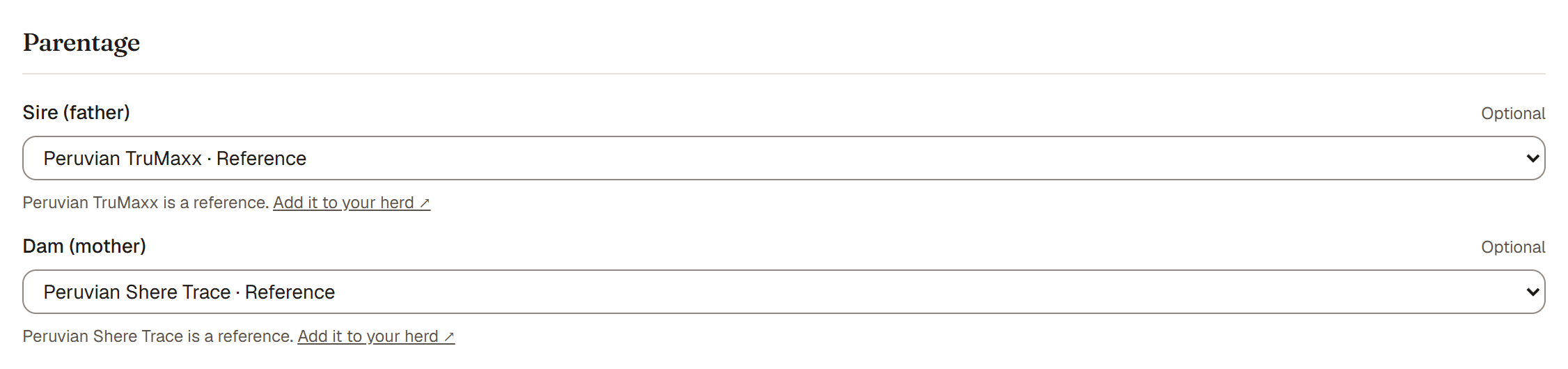
On an animal's edit form, and on a reference animal's form, the Sire (father) and Dam (mother) fields set the parents. Each is one name field: type the name, then link a saved animal or keep just the name. Leave it empty if you do not know.
Type a name
As you type, saved animals that match show under the field: animals from your herd (marked Your herd) and reference animals (marked Reference). Capitals and accents do not matter, and part of a name is enough.
- Link a saved animal. Press Use next to the right one. The field then shows the linked animal. Linking is what powers the family tree and the inbreeding (COI) math. A reference does not use up your plan limit.
- Keep just the name. If the parent is not saved, type the name and leave it. The name shows in the pedigree but is not clickable. Names you typed on other animals show as Name only, so siblings get the same spelling.
- Change your mind. Press Change on a linked animal to type again.
Good to know. Link a saved animal whenever you can. A linked animal connects to the family tree and counts in inbreeding math. A typed-in name is just text.
Steps
- Open the animal and choose Edit.
- Scroll to Sire (father) and Dam (mother).
- Type the name. Press Use on a saved animal, or leave the name as it is.
- Save.
Helpful nudges
- When you keep just a name, you see "Will this parent come up again? Save as a reference animal." Tap it to turn that name into a reusable reference, so you can link it on other animals too.
- If you linked a reference, you may see "Add it to your herd." Tap it to turn that reference into a full tracked animal you manage.