 AlpacaKeep
The Website widget puts your live for-sale animals on your own website. You copy one line of code from AlpacaKeep, paste it into your site, and your listings show up. When a visitor clicks a card, they land on the animal's AlpacaKeep sale page.
Plan. The widget needs the Farm plan, and your farm has to be switched on in the public marketplace (Marketplace → Public profile). Until both are true, the widget shows an empty state.
Where to find it
Marketplace → Website widget is the fourth tab in your marketplace hub. Only owners and co-owners see it. Everything you pick shows in a live preview next to the code, so you can see the result before you paste anything.
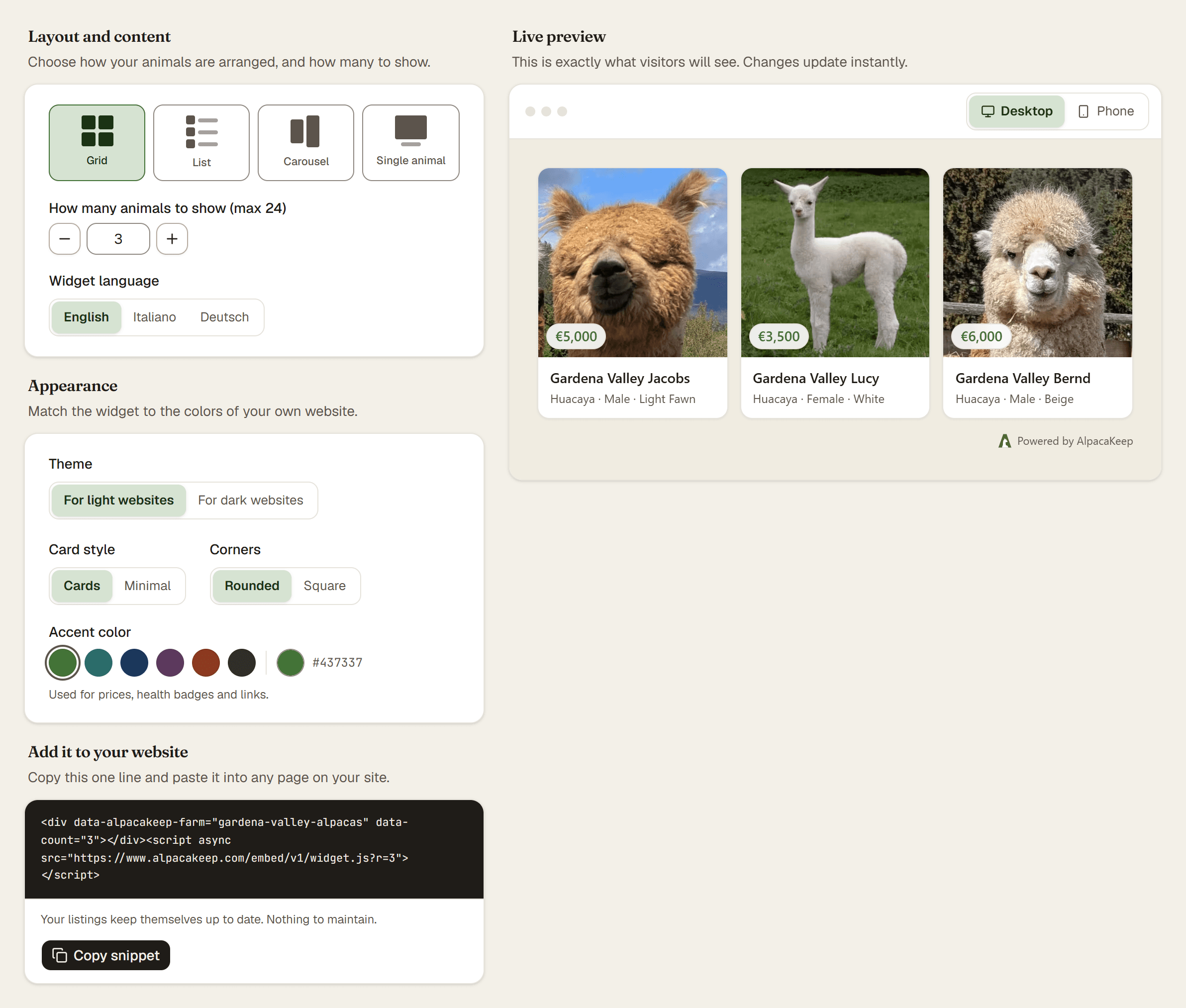
Pick a layout
Choose the shape that matches the space on your site.
- Grid. Two or three columns of cards, depending on how wide the box on your site is. The best choice for a For sale page.
- List. One row per animal, thumb on the left, price on the right. Good for a narrow sidebar.
- Carousel. A swipeable row of cards. Good for a homepage strip where you want to hint that there is more without taking up much height.
- Single animal. One picked animal in a bigger card. Good for featuring a new cria or a foundation stud.
Set How many animals to show for the first three (1 to 24). The single view picks the one animal from a thumbnail list.
Appearance
Four levers to match your own site:
- Theme. For light websites or For dark websites. Pick the one that matches your site. There is no auto-choice: the widget follows your site, not the visitor's device.
- Card style. Cards gives each animal a raised surface. Minimal puts the photo and text straight on your page, for sites whose section already has its own frame.
- Corners. Rounded or Square, so the widget can match your site's own geometry.
- Accent color. Used for prices, health badges and links. Pick a preset, type a hex, or reset to the AlpacaKeep green.
Widget language
Pick the language your visitors read, not the language you use inside AlpacaKeep. English, Italian, and German are supported. Prices show in your farm's own currency.
Paste it into your site
Copy the snippet from the card at the bottom of the tab. Then open your site and paste it where you want the animals to appear.
- WordPress. Edit the page or post. Add a Custom HTML block and paste the snippet. If the snippet vanishes when you save, your plan or your user role is not allowed to add scripts. Use the text link below instead.
- Wix. In the editor, choose Add → Embed → Embed HTML and paste the snippet. Wix sizes the box itself, so drag it to fit your widget. Wix runs embedded code inside its own frame, so your widget sits in a box rather than flowing with the rest of the page.
- Jimdo. Only the older Jimdo Creator has an HTML element. The current Jimdo Website Builder cannot add code at all, so use the text link below instead.
- Squarespace. Insert a Code block, set the type to HTML, and paste the snippet. Code blocks need a Core plan or higher. Squarespace sometimes hides embedded code while you are logged in, so check the page in a private browser window before assuming it is broken.
Watch out. Some plans block third-party scripts or hide the code block entirely: WordPress.com free, Wix Free, Squarespace below Core, and the current Jimdo Website Builder. On those sites the widget will not appear. Use the text link below instead.
The widget shows for you but not for your visitors? That is most likely a speed plugin (SiteGround Speed Optimizer, WP Rocket, LiteSpeed Cache, Autoptimize) merging the old snippet into another file. Copy the snippet again and replace the one already on your page: delete the old one, do not add to it. Then clear your speed plugin's cache. Those plugins skip logged-in users, which is why the page looks fine to you.
The text link, for sites that block code
Under the snippet there is a plain link ("See our animals for sale") that points at your farm page on AlpacaKeep. Paste that anywhere HTML is allowed. Same destination, no code.
What a buyer sees
The widget shows a small card per animal: photo, name, price (or "Price on request"), sex, fiber type and color, plus badges when they apply. Clicking a card opens the full sale page on AlpacaKeep in a new tab. If your farm has more animals listed than the widget shows, a View all N animals link appears in the footer and opens your farm page.
Under the widget, one short line credits AlpacaKeep and links back to your farm page. That is how buyers who saw your animals on your site can still find their way to you on AlpacaKeep. In the widget's own footer, a small Report content link lets a visitor report a listing to us, as every marketplace must offer.
Nothing to maintain
The widget always reflects what is live on AlpacaKeep. Mark an animal sold or unlist it, and it disappears from your site within a minute or so. List a new one and it shows up. No refreshing your site, no re-copying the code.
Good to know. The widget sets no cookies and does not track your visitors, so it needs no cookie banner. Your visitors' browsers do load the widget and its photos from AlpacaKeep, so our servers see the usual technical details any website sees, such as the IP address. It is a good idea to mention this in your own privacy notice. You can copy this paragraph:
On this page we show our animals with a widget from AlpacaKeep, operated by Devid Demetz. When you open the page, your browser loads the widget from AlpacaKeep's servers, which receive technical request data such as your IP address. The widget sets no cookies and does not track you. You can read how AlpacaKeep handles this data in its privacy policy: https://www.alpacakeep.com/legal/privacy
Watch out. If you rename your farm, the widget keeps working: it uses a stable id that does not change with your name. The only thing that stops it is turning your farm off in Marketplace → Public profile, or dropping below the Farm plan.