 AlpacaKeep
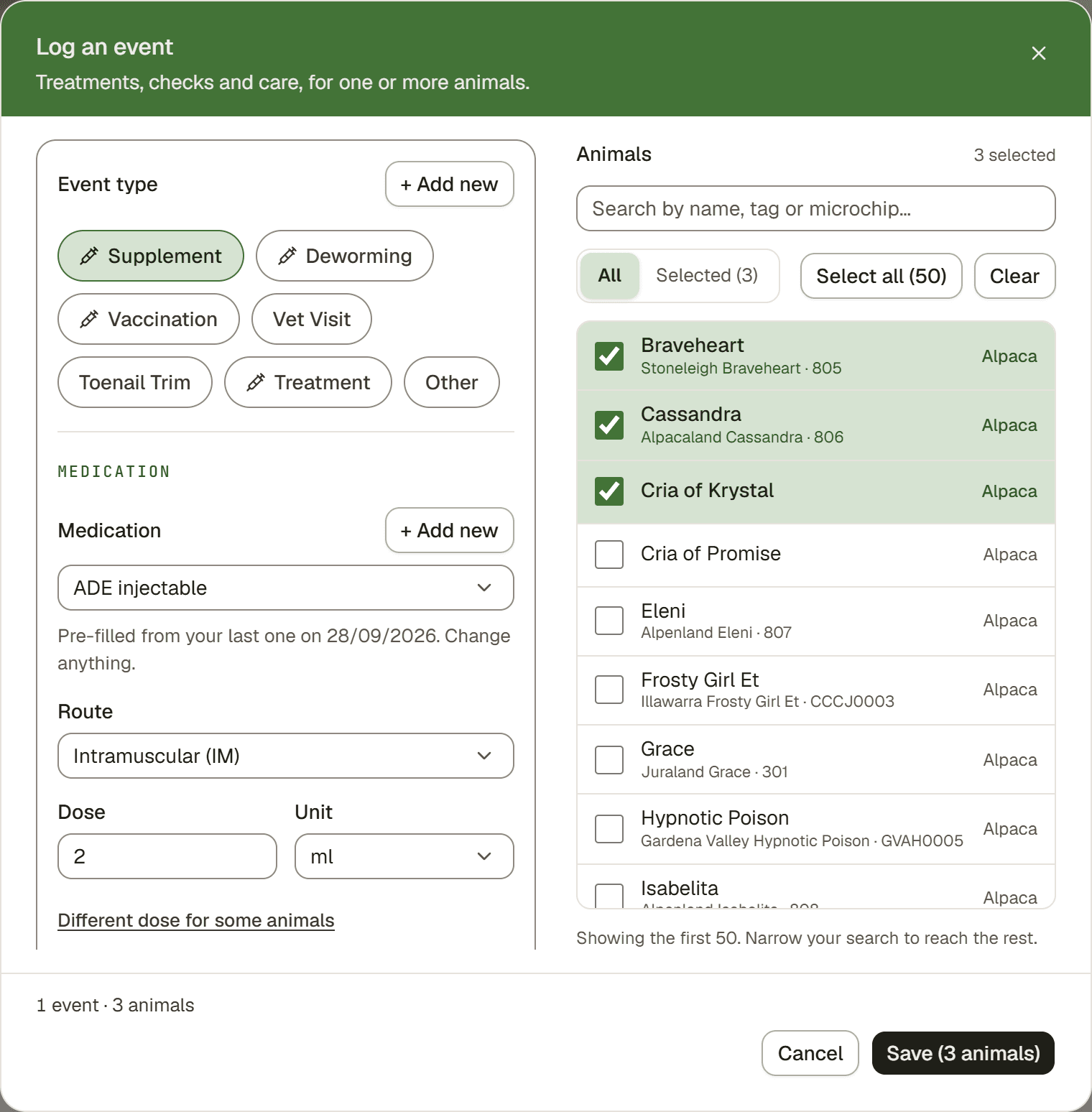
Log an event is a drawer that slides in for recording what you just did: a vaccination, a treatment, a check. It is the one place to start logging, for one animal or a whole pen.
How to open it
- Press Add, then Log an event. Add is in the sidebar on a computer and the round add button on a phone.
- On the Events page, press Log an event at the top. On a phone this button is hidden, so use the round add button instead.
- On an animal, open its Health tab and press Log an event at the top. That animal is picked for you.
- On the Animals page, tick the animals (on a phone, tap Select first) and press Log event in the bar at the bottom. They are picked for you, and stay ticked for the next job.
Steps
- Pick the event type. The choices are ordered by what your farm logs most often.
- Pick the animals. On a phone, tap the Animals row to open the picker. Filter by paddock, search, or Select all, then tap Done.
- Check the details. The medication and route are pre-filled from your farm's last event of that type, with a note showing which date they came from. The dose is pre-filled too, unless the medication is dosed by body weight. Change anything. The batch number and expiry date never carry over. If there is no earlier event but your library has exactly one medication of the right kind, it is picked for you, and you choose the route yourself.
- Did more than one thing? Tap "+ Add another" and log the next event, up to 4 in one save. A finished event folds down to one line. Tap the line to edit it.
- Save. Everything saves together. Right after, the drawer shows an Undo button, and that one undo removes it all. Each event also gets its own row on the Events page.
A dose for each animal
For a medication dosed by body weight, the drawer works out each animal's dose from its weight on the date of the entry. A line shows the total, for example "5 animals · 40.4 mg total". Tap Doses to see every animal with its dose and its weight. Type over any dose to change it.
A row without a dose says why, with a quick fix:
- No weight by that date: type the dose, or tap the line and enter a rough weight next to About. A guess only fills this dose. It is never saved as a weight.
- A weight too old for the animal's age: a cria's weight counts for two weeks only. Tap Use to take the dose from it anyway, or Add birth date.
- Same dose for all fills every empty row at once.
For a dose that is the same for every animal, type it once. Different dose for some animals lets you give a cria less.
Saving with animals that have no dose? The drawer asks first. Tap Add doses, or Save anyway if you do not know the dose yet.
Tip. No scale? Set the medicine up as Same for every animal with your vet's dose for an adult, and it fills in for every animal. See Your medication list and your medicine cabinet.
When a vet prescribed it
Most treatments are your own call, so the prescription fields stay hidden. When a vet prescribed the medicine, tick Prescribed by a vet and fill in what you have: Prescribed by (the vet's name and phone), the Prescription no. if the paper has one, and a Photo or scan of it. One file covers every animal in that event, and none of it carries over to your next entry.
After saving
The confirmation keeps the treatment and clears the animals, ready for the next pen. Press Same animals, something else to log a second thing for the same group instead.
Good to know
Good to know. Closed the drawer by accident, by tapping outside it? Nothing is lost. Open it again and your entry is back, with a Discard button if you do not want it. Only Cancel throws the entry away.
Watch out. Conformation checks and follow-up reminders need the Detailed log page instead. Open it with the link under + Add another, which brings your animals along, or from the ⋯ menu on the Events page. See Detailed log: big jobs for a whole group.